
Distributed and Cloud Computing Assignment 4
- Distributed Systems
- 2026-01-07
- 300 Views
- 0 Comments
- 4557 Words
Feedback
Feedback to Learner
12/30/25 3:55 PM
82+5=87 (extra: 0)

> Summary: As we demonstrated in the lab, you should pre-assign labels and taints to cluster nodes using Kind config YAML. Other parts are all perfect!

> T0 - K8s Resource
1. Container: no pod ip env, but it's probably okay to infer from socket.gethostbyname (-0) from my test it worked so you will have the points

> T0 - Report
2. recommended to use declarative approach rather than imperative to update image version tag: this avoids unexpected drift between your maintained desired states of your infra and the actual states (-0 to be nice)
3. nice analysis with figures!

> T1 - Kind
4. no labels applied (-15)
5. no taints applied (-3)
6. check the instructions: we require you to "pre-assign" them to the cluster nodes and we have showed you examples during the lab

> T1 - Report
7. you mentioned the order as 2 -> 3 -> 4 -> 5 -> 1, which is not correct, should be 2/3 -> 1 -> 4/5 if toleration is applied (-0 since your table indicates your answer and it is more important for me to grade)
8. when you gradually scale out, it might be better to wait for a bit so there will not be multiple pods with AGE=0s in the result, making it a bit clearer and easier to verify (-0 to be nice)

> Bonus
9. MPI - larger matrix sizes: this is a hard choice. When more memory is consumed for matrix data and processes, the program is easier to encounter segmentation fault.
10. Parallel BFS / MP impl with MPI: Yes, Parallel BFS is a nice option we have considered at the beginning of the semester but did not have time to rollout our A1 (+5) For MP with MPI, maybe this is not very straightforward since we have already mentioned their main difference in the lab - where the data is and how the data is distributed. Some students suggest implementing MPI from scratch, which sounds better but of couse, difficult (we will discuss a bit later)
11. NCCL & Kookkos: sounds like a nice extension of HPC-relevant content! (+0 since you've reached max bonus)
12. A2 listing APIs: they are clearly mentioned in the instructions PDF.
13. benchmark A2: really enjoy your experiments with hey and the course selection analysis. Will consider in the future so the students have more concrete stuff to write about their experiments! (+0 since you've reached max bonus)
14. A3 paper reading: nice idea and we will consider doing this in the future (+0 since you've reached max bonus)
15. A3 self-checking: an easy way is to compare the results with a pure python impl.
16. FaaS + K8s: in K8s, serverless functions may be similar to the Job concept; actually, we have planned to extend A4 to include a FaaS + IaC task in the future (+0)
17. very nice blog you have there! It makes me sad for 5s as now all the assignments are public for future students, but why not? you have good designs and nice experiments to share with other learners over the internet, which is cool. no worries, it will just take me a bit more time to think about other interesting assignments within the same topic. Keep up with your work!
Haibin Lai
12211612
In this assignment, we built a k8s cluster.
Install k8s
curl -LO "https://dl.k8s.io/release/$(curl -L -s https://dl.k8s.io/release/stable.txt)/bin/linux/amd64/kubectl"
sudo install -o root -g root -m 0755 kubectl /usr/local/bin/kubectl
(If you don't have the root access, use the following command to install it)
chmod +x kubectl
mkdir -p ~/.local/bin
mv ./kubectl ~/.local/bin/kubectl
Install kind
mkdir -p ~/.local/bin
curl -Lo ~/.local/bin/kind https://kind.sigs.k8s.io/dl/v0.23.0/kind-linux-amd64
chmod +x ~/.local/bin/kind
echo 'export PATH="$HOME/.local/bin:$PATH"' >> ~/.bashrc
source ~/.bashrc
Task 0
Change Flask Server
We design a server than can send its pod name, pod IP, and node name.
Also, according to the blog https://cloud.google.com/blog/products/containers-kubernetes/kubernetes-best-practices-terminating-with-grace , k8s will send SIGTEM signal when shutdown. So we add handle_sigterm function to shutdown the server gracefully.
from flask import Flask
import os
import socket
import signal
import sys

app = Flask(__name__)

# ---- Graceful Shutdown ----
def handle_sigterm(signum, frame):
    print("Received SIGTERM, shutting down gracefully...")
    sys.exit(0)

# SIGTERM
signal.signal(signal.SIGTERM, handle_sigterm)

@app.route("/")
def hello():
    pod_name = os.getenv("POD_NAME", socket.gethostname())
    node_name = os.getenv("NODE_NAME", "unknown-node")

    # Pod IP
    try:
        pod_ip = socket.gethostbyname(socket.gethostname())
    except Exception:
        pod_ip = "unknown-ip"

    return (
        f"Hello from pod={pod_name}, "
        f"ip={pod_ip}, "
        f"node={node_name}!\n"
    )

@app.route("/chat/<username>")
def chat(username):
    return f"Hello {username}! Greetings from Kubernetes pod.\n"

if __name__ == "__main__":
    port = int(os.getenv("FLASK_PORT", 5000))
    app.run(host="0.0.0.0", port=port)
Dockerfile:
FROM python:3-slim

WORKDIR /app

COPY requirements.txt app.py ./
RUN pip3 install --no-cache-dir -r requirements.txt

CMD [ "python", "app.py" ]
build the image of the modified Python Flask server via Dockerfile:
docker build -t flask-app:1.0.0 .Create cluster
Kind cluster configuration:
kind-config.yaml:
# a 4-node k8s cluster (1 control plane + 3 worker nodes)
# t0/kind-config.yaml
kind: Cluster
apiVersion: kind.x-k8s.io/v1alpha4
nodes:
  - role: control-plane
  - role: worker
  - role: worker
  - role: worker
A 4-node cluster (1 control plane + 3 worker nodes).
The flask-dep Deployment defines a desired state of four Flask pods, each running the container image flask-app:1.0.0. Kubernetes continuously maintains this state by creating, replacing, or rescheduling pods as needed. Environment variables POD_NAME and NODE_NAME are injected via the Downward API so that each pod can report its identity and runtime location.
K8s resource configuration
apiVersion: apps/v1
kind: Deployment
metadata:
  name: flask-dep
spec:
  replicas: 4
  selector:
    matchLabels:
      app: flask
  template:
    metadata:
      labels:
        app: flask
    spec:
      containers:
      - name: flask
        image: flask-app:1.0.0  # image name
        imagePullPolicy: IfNotPresent
        ports:
        - containerPort: 5000
        env:
        - name: POD_NAME
          valueFrom:
            fieldRef:
              fieldPath: metadata.name
        - name: NODE_NAME
          valueFrom:
            fieldRef:
              fieldPath: spec.nodeName
---
apiVersion: v1
kind: Service
metadata:
  name: flask-svc
spec:
  selector:
    app: flask
  ports:
  - port: 5000
    targetPort: 5000
  type: ClusterIP
The flask-svc Service exposes all pods labeled app=flask under a single stable virtual endpoint. It load-balances incoming traffic across the four pod replicas using kube-proxy, giving the client a unified access point while abstracting away pod IP changes.
Use command kind create cluster --name a4 --config kind-config.yaml to create the cluster.
(base) cc@taskflow01:~/Distributed-and-Cloud-Computing/assignment4/assignment_4/codebase/t0$ kind create cluster --name a4 --config kind-config.yaml
Creating cluster "a4" ...
 ✓ Ensuring node image (kindest/node:v1.30.0) 🖼
 ✓ Preparing nodes 📦 📦 📦 📦
 ✓ Writing configuration 📜
 ✓ Starting control-plane 🕹️
 ✓ Installing CNI 🔌
 ✓ Installing StorageClass 💾
 ✓ Joining worker nodes 🚜
Set kubectl context to "kind-a4"
You can now use your cluster with:

kubectl cluster-info --context kind-a4

Have a question, bug, or feature request? Let us know! https://kind.sigs.k8s.io/#community 🙂
(base) cc@taskflow01:~/Distributed-and-Cloud-Computing/assignment4/assignment_4/codebase/t0$ kubectl get nodes
NAME               STATUS   ROLES           AGE   VERSION
a4-control-plane   Ready    control-plane   34s   v1.30.0
a4-worker          Ready    <none>          15s   v1.30.0
a4-worker2         Ready    <none>          15s   v1.30.0
a4-worker3         Ready    <none>          14s   v1.30.0
load the image
kind load docker-image flask-app:1.0.0 --name a4kubectl describe nodes | grep -i imageLoad my local docker images into the Kind cluster nodes.
(base) cc@taskflow01:~/Distributed-and-Cloud-Computing/assignment4/assignment_4/codebase/t0$ kind load docker-image flask-app:1.0.0 --name a4
Image: "flask-app:1.0.0" with ID "sha256:3ae216d03526d0f294123acba1462b08fa15db6052533ae9580ab82aa3c6e5cd" not yet present on node "a4-control-plane", loading...
Image: "flask-app:1.0.0" with ID "sha256:3ae216d03526d0f294123acba1462b08fa15db6052533ae9580ab82aa3c6e5cd" not yet present on node "a4-worker2", loading...
Image: "flask-app:1.0.0" with ID "sha256:3ae216d03526d0f294123acba1462b08fa15db6052533ae9580ab82aa3c6e5cd" not yet present on node "a4-worker", loading...
Image: "flask-app:1.0.0" with ID "sha256:3ae216d03526d0f294123acba1462b08fa15db6052533ae9580ab82aa3c6e5cd" not yet present on node "a4-worker3", loading...
(base) cc@taskflow01:~/Distributed-and-Cloud-Computing/assignment4/assignment_4/codebase/t0$ kubectl describe nodes | grep -i image
  OS Image:                   Debian GNU/Linux 12 (bookworm)
  OS Image:                   Debian GNU/Linux 12 (bookworm)
  OS Image:                   Debian GNU/Linux 12 (bookworm)
  OS Image:                   Debian GNU/Linux 12 (bookworm)
(base) cc@taskflow01:~/Distributed-and-Cloud-Computing/assignment4/assignment_4/codebase/t0$ kubectl apply -f t0.yaml
deployment.apps/flask-dep created
service/flask-svc created
(base) cc@taskflow01:~/Distributed-and-Cloud-Computing/assignment4/assignment_4/codebase/t0$ kubectl get pods -o wide
NAME                         READY   STATUS    RESTARTS   AGE   IP           NODE         NOMINATED NODE   READINESS GATES
flask-dep-75d4749db4-k9mql   1/1     Running   0          8s    10.244.1.2   a4-worker    <none>           <none>
flask-dep-75d4749db4-knjx7   1/1     Running   0          8s    10.244.3.2   a4-worker3   <none>           <none>
flask-dep-75d4749db4-ll2ts   1/1     Running   0          8s    10.244.2.2   a4-worker2   <none>           <none>
flask-dep-75d4749db4-vjqc8   1/1     Running   0          8s    10.244.3.3   a4-worker3   <none>           <none>
Testing
Send multiple requests to the exposed service to test the modified root API.
(base) cc@taskflow01:~/Distributed-and-Cloud-Computing/assignment4/assignment_4/codebase/t0$ kubectl run curl-pod --image=curlimages/curl:8.10.1 --restart=Never -it -- sh
All commands and output from this session will be recorded in container logs, including credentials and sensitive information passed through the command prompt.
If you don't see a command prompt, try pressing enter.
~ $ curl flask-svc:5000/
Hello from pod=flask-dep-75d4749db4-knjx7, ip=10.244.3.2, node=a4-worker3!
~ $ curl flask-svc:5000/
Hello from pod=flask-dep-75d4749db4-ll2ts, ip=10.244.2.2, node=a4-worker2!
~ $ curl flask-svc:5000/
Hello from pod=flask-dep-75d4749db4-vjqc8, ip=10.244.3.3, node=a4-worker3!
~ $ curl flask-svc:5000/
Hello from pod=flask-dep-75d4749db4-knjx7, ip=10.244.3.2, node=a4-worker3!
~ $ curl flask-svc:5000/
Hello from pod=flask-dep-75d4749db4-k9mql, ip=10.244.1.2, node=a4-worker!
~ $ curl flask-svc:5000/
Hello from pod=flask-dep-75d4749db4-ll2ts, ip=10.244.2.2, node=a4-worker2!
~ $ curl flask-svc:5000/
Hello from pod=flask-dep-75d4749db4-ll2ts, ip=10.244.2.2, node=a4-worker2!
The worker is changing. In this setup, the client only talks to the Kubernetes Service flask-svc instead of individual pods. The Service is implemented as a virtual IP (ClusterIP) and a set of backend endpoints, each corresponding to one running pod in the flask-dep deployment.
When the curl-pod sends HTTP requests to flask-svc:5000, kube-proxy on the node intercepts the traffic and performs load balancing at L4 (TCP). For each incoming connection, kube-proxy selects one of the healthy pod IPs (e.g., 10.244.1.2, 10.244.2.2, 10.244.3.2, 10.244.3.3) and forwards the request to that pod.
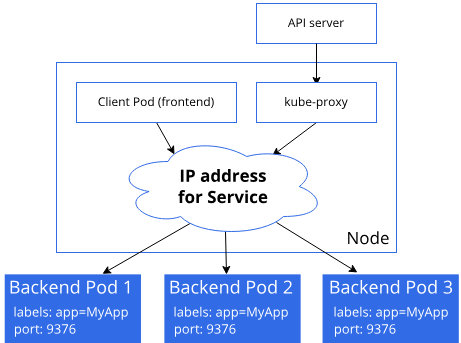
https://kubernetes.io/docs/reference/networking/virtual-ips/
As a result, even though the client always uses the same Service address, different requests are handled by different pod instances across multiple worker nodes. The sequence of responses we observed shows that the Service distributes traffic across all four pods in a roughly round-robin / random fashion, without any session stickiness. Some pods may handle multiple consecutive requests simply due to the probabilistic nature of the load-balancing decision.
Manually kill one server pod
(base) cc@taskflow01:~/Distributed-and-Cloud-Computing/assignment4$ kubectl get pods -o wide
NAME                         READY   STATUS      RESTARTS   AGE     IP           NODE         NOMINATED NODE   READINESS GATES
curl-pod                     0/1     Completed   0          3h13m   10.244.1.3   a4-worker    <none>           <none>
flask-dep-75d4749db4-k9mql   1/1     Running     0          3h16m   10.244.1.2   a4-worker    <none>           <none>
flask-dep-75d4749db4-knjx7   1/1     Running     0          3h16m   10.244.3.2   a4-worker3   <none>           <none>
flask-dep-75d4749db4-ll2ts   1/1     Running     0          3h16m   10.244.2.2   a4-worker2   <none>           <none>
flask-dep-75d4749db4-vjqc8   1/1     Running     0          3h16m   10.244.3.3   a4-worker3   <none>           <none>
Kill a pod:
(base) cc@taskflow01:~/Distributed-and-Cloud-Computing/assignment4$ kubectl delete pod  flask-dep-75d4749db4-knjx7

pod "flask-dep-75d4749db4-knjx7" deleted from default namespace
(base) cc@taskflow01:~/Distributed-and-Cloud-Computing/assignment4$ kubectl get pods -w
NAME                         READY   STATUS      RESTARTS   AGE
curl-pod                     0/1     Completed   0          3h13m
flask-dep-75d4749db4-jfhbd   1/1     Running     0          5s
flask-dep-75d4749db4-k9mql   1/1     Running     0          3h16m
flask-dep-75d4749db4-ll2ts   1/1     Running     0          3h16m
flask-dep-75d4749db4-vjqc8   1/1     Running     0          3h16m
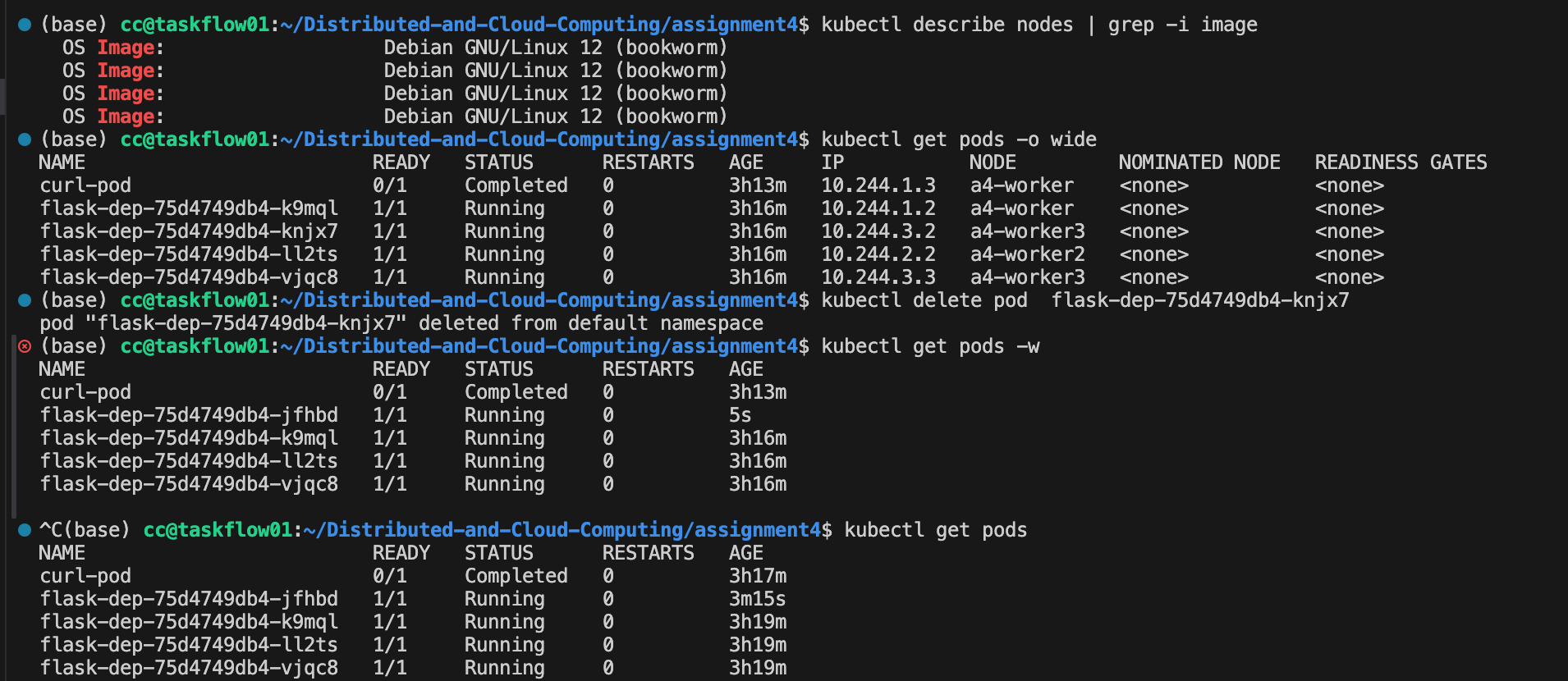
Immediately after deletion, kubectl get pods -w showed that the pod transitioned to the Terminating state and, almost at the same time, a new pod with a different name was created and scheduled to one of the worker nodes. From kubectl describe rs, we can see that the ReplicaSet associated with the deployment continuously enforces the desired replica count (spec.replicas = 4). Once it detects that one replica is missing, it automatically creates a replacement pod.
In other words, the client-facing Service and Deployment remain unaffected: the Service still has four backend endpoints, and new requests can be transparently routed to the newly created pod. This demonstrates Kubernetes’ built-in self-healing capability, where the control plane automatically recovers from individual pod failures without any manual intervention on the application side.
Add new API
# greet-with-info API
@app.route("/chat/<username>")
def chat(username):
    pod_name = os.getenv("POD_NAME", socket.gethostname())
    node_name = os.getenv("NODE_NAME", "unknown-node")

    return (
        f"Hello {username}! "
        f"This response is served by pod={pod_name} on node={node_name}.\n"
    )
docker build -t flask-app:1.0.1 .
kind load docker-image flask-app:1.0.1 --name a4After extending the Flask server with the greet-with-info API (/chat/{username}), we built a new container image flask-app:1.0.1 and rolled out the update by changing the image of the existing deployment
(base) cc@taskflow01:~/Distributed-and-Cloud-Computing/assignment4/assignment_4/reference_demo/revproxy_nginx/flask_app$ kubectl set image deployment/flask-dep flask=flask-app:1.0.1
deployment.apps/flask-dep image updated
(base) cc@taskflow01:~/Distributed-and-Cloud-Computing/assignment4/assignment_4/reference_demo/revproxy_nginx/flask_app$ kubectl rollout status deployment/flask-dep
deployment "flask-dep" successfully rolled out
During the rollout, kubectl rollout status and kubectl describe deployment show that Kubernetes gradually replaces the old pods with new ones. Internally, the deployment controller manages two ReplicaSets: the old one (using flask-app:1.0.0) and the new one (using flask-app:1.0.1). The controller scales up the new ReplicaSet while scaling down the old one, ensuring that the number of available replicas stays within the limits defined by maxUnavailable and maxSurge.
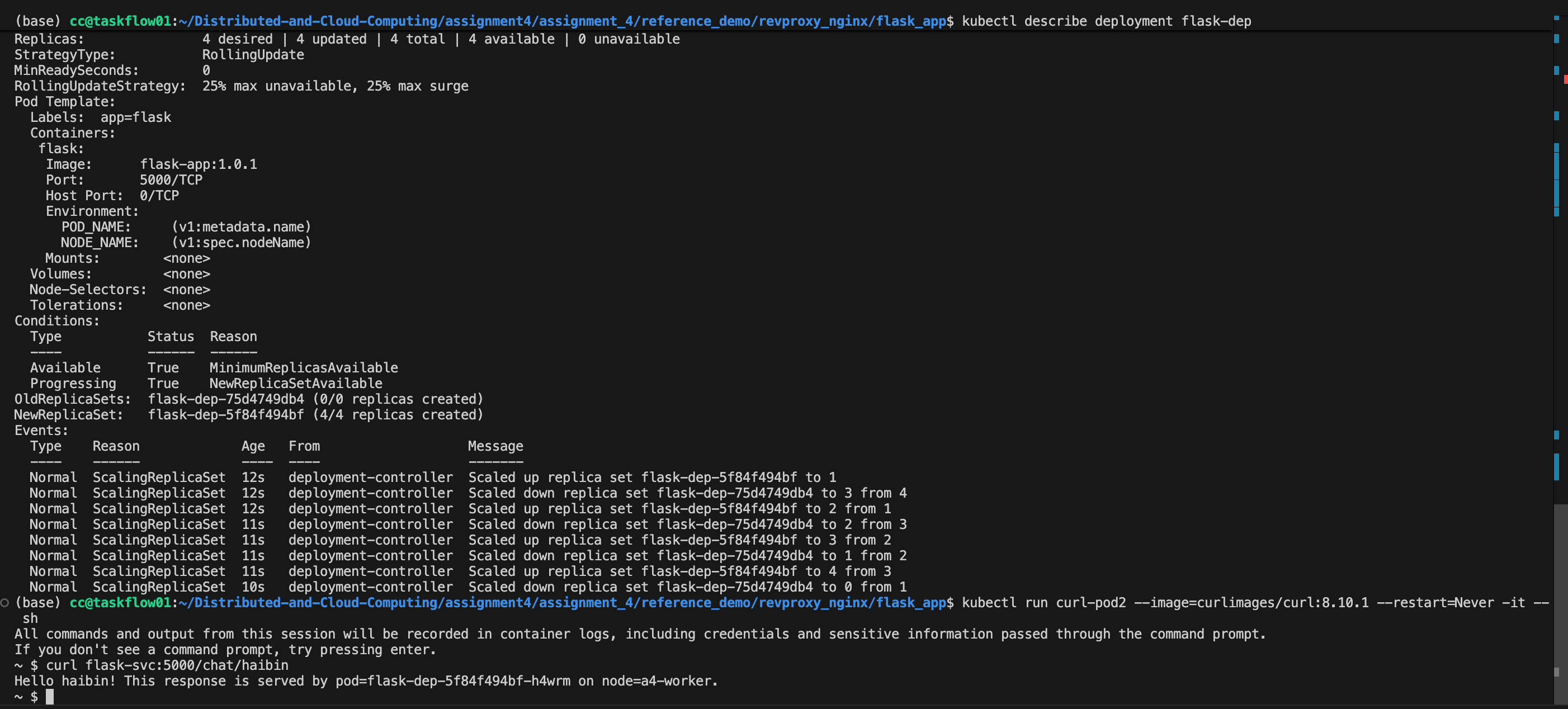
We can see the update info using kubectl describe deployment flask-dep
(base) cc@taskflow01:~/Distributed-and-Cloud-Computing/assignment4/assignment_4/reference_demo/revproxy_nginx/flask_app$ kubectl describe deployment flask-dep
Name:                   flask-dep
Namespace:              default
CreationTimestamp:      Sat, 06 Dec 2025 15:34:08 +0000
Labels:                 <none>
Annotations:            deployment.kubernetes.io/revision: 2
Selector:               app=flask
Replicas:               4 desired | 4 updated | 4 total | 4 available | 0 unavailable
StrategyType:           RollingUpdate
MinReadySeconds:        0
RollingUpdateStrategy:  25% max unavailable, 25% max surge
Pod Template:
  Labels:  app=flask
  Containers:
   flask:
    Image:      flask-app:1.0.1
    Port:       5000/TCP
    Host Port:  0/TCP
    Environment:
      POD_NAME:     (v1:metadata.name)
      NODE_NAME:    (v1:spec.nodeName)
    Mounts:        <none>
  Volumes:         <none>
  Node-Selectors:  <none>
  Tolerations:     <none>
Conditions:
  Type           Status  Reason
  ----           ------  ------
  Available      True    MinimumReplicasAvailable
  Progressing    True    NewReplicaSetAvailable
OldReplicaSets:  flask-dep-75d4749db4 (0/0 replicas created)
NewReplicaSet:   flask-dep-5f84f494bf (4/4 replicas created)
Events:
  Type    Reason             Age   From                   Message
  ----    ------             ----  ----                   -------
  Normal  ScalingReplicaSet  12s   deployment-controller  Scaled up replica set flask-dep-5f84f494bf to 1
  Normal  ScalingReplicaSet  12s   deployment-controller  Scaled down replica set flask-dep-75d4749db4 to 3 from 4
  Normal  ScalingReplicaSet  12s   deployment-controller  Scaled up replica set flask-dep-5f84f494bf to 2 from 1
  Normal  ScalingReplicaSet  11s   deployment-controller  Scaled down replica set flask-dep-75d4749db4 to 2 from 3
  Normal  ScalingReplicaSet  11s   deployment-controller  Scaled up replica set flask-dep-5f84f494bf to 3 from 2
  Normal  ScalingReplicaSet  11s   deployment-controller  Scaled down replica set flask-dep-75d4749db4 to 1 from 2
  Normal  ScalingReplicaSet  11s   deployment-controller  Scaled up replica set flask-dep-5f84f494bf to 4 from 3
  Normal  ScalingReplicaSet  10s   deployment-controller  Scaled down replica set flask-dep-75d4749db4 to 0 from 1
In our case, the deployment uses the default rolling update strategy, where maxUnavailable and maxSurge are both 25%. With 4 desired replicas, this means that at most 1 pod can be unavailable during the update, and Kubernetes is allowed to temporarily create up to 1 extra pod above the desired replica count. Concretely, the deployment may briefly run 5 pods (old + new) when scaling up, and then reduce back to 4 pods as old ones are terminated. This behavior is reflected in the events:
- [old=4, new=0] → [old=4, new=1] → [old=3, new=1]
- → [old=3, new=2] → [old=2, new=2]
- → [old=2, new=3] → [old=1, new=3]
- → [old=1, new=4] → [old=0, new=4]
After the rollout completed, sending requests to /chat/{username} through the Service confirmed that the new API was live and being served by the updated pods. This shows that the rolling update mechanism can upgrade the application version without downtime, while respecting the availability constraints specified by maxUnavailable and maxSurge.
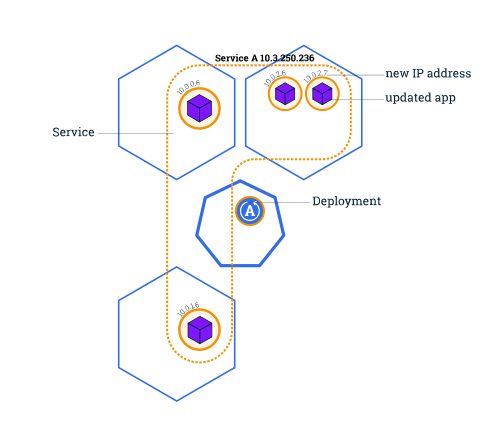
https://kubernetes.io/zh-cn/docs/tutorials/kubernetes-basics/update/update-intro/
Verify the API that changed:
(base) cc@taskflow01:~/Distributed-and-Cloud-Computing/assignment4/assignment_4/reference_demo/revproxy_nginx/flask_app$ kubectl run curl-pod2 --image=curlimages/curl:8.10.1 --restart=Never -it -- sh
All commands and output from this session will be recorded in container logs, including credentials and sensitive information passed through the command prompt.
If you don't see a command prompt, try pressing enter.
~ $ curl flask-svc:5000/chat/haibin
Hello haibin! This response is served by pod=flask-dep-5f84f494bf-h4wrm on node=a4-worker.
we can see that we have This response is served by pod=flask-dep-5f84f494bf-h4wrm on node=a4-worker., this is changed in our version 1.0.1
So API now changed.
To delete the cluster a4:
kind delete cluster --name a4Task 1
Use Kind to create a 6-node cluster (1 control plane + 5 worker nodes). Write the cluster configurations to a YAML file.
| Workers | Label | Taint |
|---|---|---|
| worker1 | usage=normal | N/A |
| worker2 | usage=normal, capability=powerful | N/A |
| worker3 | usage=normal, capability=powerful | taint: class=vip |
| worker4 | usage=backup | N/A |
| worker5 | usage=backup | N/A |
For kind-config.yaml:
kind: Cluster
apiVersion: kind.x-k8s.io/v1alpha4
nodes:
  - role: control-plane
  - role: worker
  - role: worker
  - role: worker
  - role: worker
  - role: worker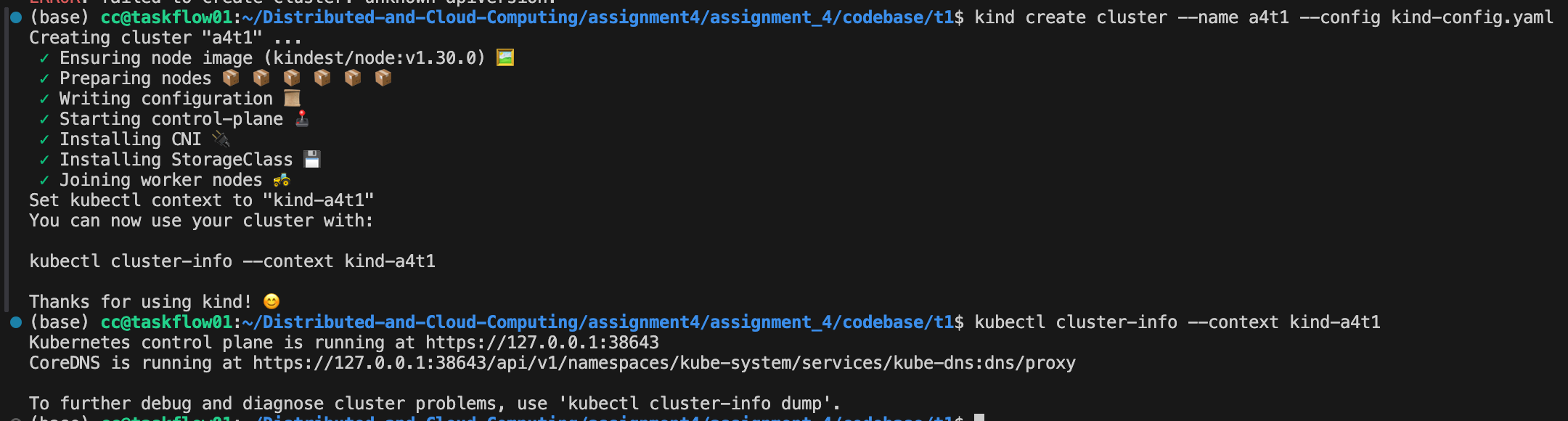
And define kind-config.yaml:
We can see Pod Anti-Affinity:every replica should in diff nodes and ② Node Affinity.
# 1 deployment - 1~5 pod replicas - 1 flask server per pod
# 1 service to expose the deployment above
# constraints:
# pod anti-affinity: pod replicas distributed to different nodes
# preferred weighted node affinity: (1) powerful nodes; (2) non-backup nodes; (3) backup nodes
# (EXTRA) how to deploy pods to nodes with taints?
apiVersion: apps/v1
kind: Deployment
metadata:
  name: flask-dep-t1
spec:
  replicas: 1          # start from 1
  selector:
    matchLabels:
      app: flask-t1
  template:
    metadata:
      labels:
        app: flask-t1
    spec:
      containers:
      - name: flask
        image: flask-app:1.0.1      # images
        imagePullPolicy: IfNotPresent
        ports:
        - containerPort: 5000
        env:
        - name: POD_NAME
          valueFrom:
            fieldRef:
              fieldPath: metadata.name
        - name: NODE_NAME
          valueFrom:
            fieldRef:
              fieldPath: spec.nodeName

      # ① Pod Anti-Affinity:every replica should in diff nodes
      affinity:
        podAntiAffinity:
          requiredDuringSchedulingIgnoredDuringExecution:
          - labelSelector:
              matchExpressions:
              - key: app
                operator: In
                values:
                - flask-t1
            topologyKey: "kubernetes.io/hostname"

        # ② Node Affinity
        nodeAffinity:
          preferredDuringSchedulingIgnoredDuringExecution:
          # choose powerful nodes first
          - weight: 100
            preference:
              matchExpressions:
              - key: capability
                operator: In
                values:
                - powerful
          # second, choose normal nodes
          - weight: 50
            preference:
              matchExpressions:
              - key: usage
                operator: In
                values:
                - normal
          # choose backup nodes(worker4 / worker5)
          - weight: 10
            preference:
              matchExpressions:
              - key: usage
                operator: In
                values:
                - backup

      # ③ Tolerations:allow Pod schedule into class=vip:NoSchedule 的 worker3
      tolerations:
      - key: "class"
        operator: "Equal"
        value: "vip"
        effect: "NoSchedule"
---
apiVersion: v1
kind: Service
metadata:
  name: flask-svc-t1
spec:
  selector:
    app: flask-t1
  ports:
  - port: 5000
    targetPort: 5000
  type: ClusterIP
Note: tolerations Tolerations:allow Pod schedule into class=vip:NoSchedule 的 worker3 allow us to deploy replicas to the node with vip nodes (node3 here in this example). If we don't add these lines, we can't deploy to node3.
      tolerations:
      - key: "class"
        operator: "Equal"
        value: "vip"
        effect: "NoSchedule"
Add Labels to the nodes:
kubectl label node a4t1-worker        usage=normal
kubectl label node a4t1-worker2       usage=normal capability=powerful
kubectl label node a4t1-worker3       usage=normal capability=powerful
kubectl label node a4t1-worker4       usage=backup
kubectl label node a4t1-worker5       usage=backup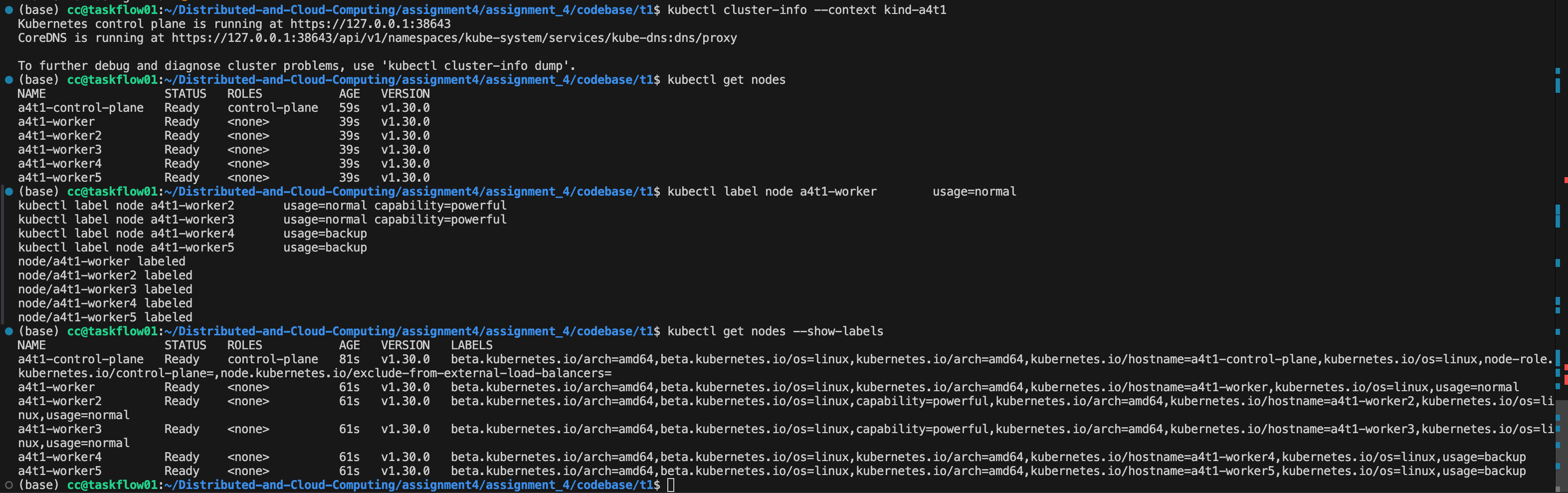
Add no schedule config to the nodes.
kubectl taint nodes a4t1-worker3 class=vip:NoScheduleThis command attaches a taint with key class, value vip, and effect NoSchedule to the node. Semantically, it tells the Kubernetes scheduler:
“Do not schedule any pods on this node unless they explicitly tolerate class=vip.”
In other words, a4t1-worker3 becomes a restricted “VIP” node. Only pods that define a matching toleration (e.g., with key=class, value=vip, effect=NoSchedule) are eligible to be placed on this node. All other pods will be rejected by the scheduler for this node and must be placed elsewhere.
Now, according to the schedule yaml file and the labels, we can see the priority of which node will be deployed sequentially (node scale as 2 -> 3 -> 4 -> 5 -> 1):
| Node | capability | usage | Scores |
|---|---|---|---|
| worker2 | powerful | normal | 100 + 50 = 150 |
| worker3 (+taint) | powerful | normal | 100 + 50 = 150 |
| worker | normal | normal | 50 |
| worker4 | backup | backup | 10 |
| worker5 | backup | backup | 10 |
The ordering of node assignments follows directly from the combination of (1) preferred node affinity weights, (2) pod anti-affinity constraints, and (3) toleration of the VIP taint on worker3. First, the scheduler chooses the two powerful nodes because they yield the highest weighted scores. Then, anti-affinity prevents placing multiple replicas on the same node, so the third pod falls back to the only remaining normal node. Finally, the two backup nodes are selected last due to their lowest affinity weight. This results in the five pods being placed across all five workers in descending priority order: powerful → normal → backup.
Pod scheduling analysis with taints, tolerations, and affinity.
Starting from the updated flask-dep-t1 deployment, I gradually scaled the number of replicas from 1 up to 5 using:
kubectl scale deployment flask-dep-t1 --replicas=N
kubectl get pods -o wide
For replicas = 2, the two pods were scheduled to a4t1-worker2 and a4t1-worker3:
flask-dep-t1-6c56d5dbb8-4gzrn   1/1     Running   0          21s   10.244.1.2   a4t1-worker2
flask-dep-t1-6c56d5dbb8-d8m69   1/1     Running   0          4s    10.244.4.2   a4t1-worker3
This behavior matches the preferred node affinity configuration: the scheduler first tries to place pods on nodes labeled capability=powerful (i.e., a4t1-worker2 and a4t1-worker3). Although a4t1-worker3 has the taint class=vip:NoSchedule, the pods in this deployment define a matching toleration for class=vip, so they are allowed to run on that node.
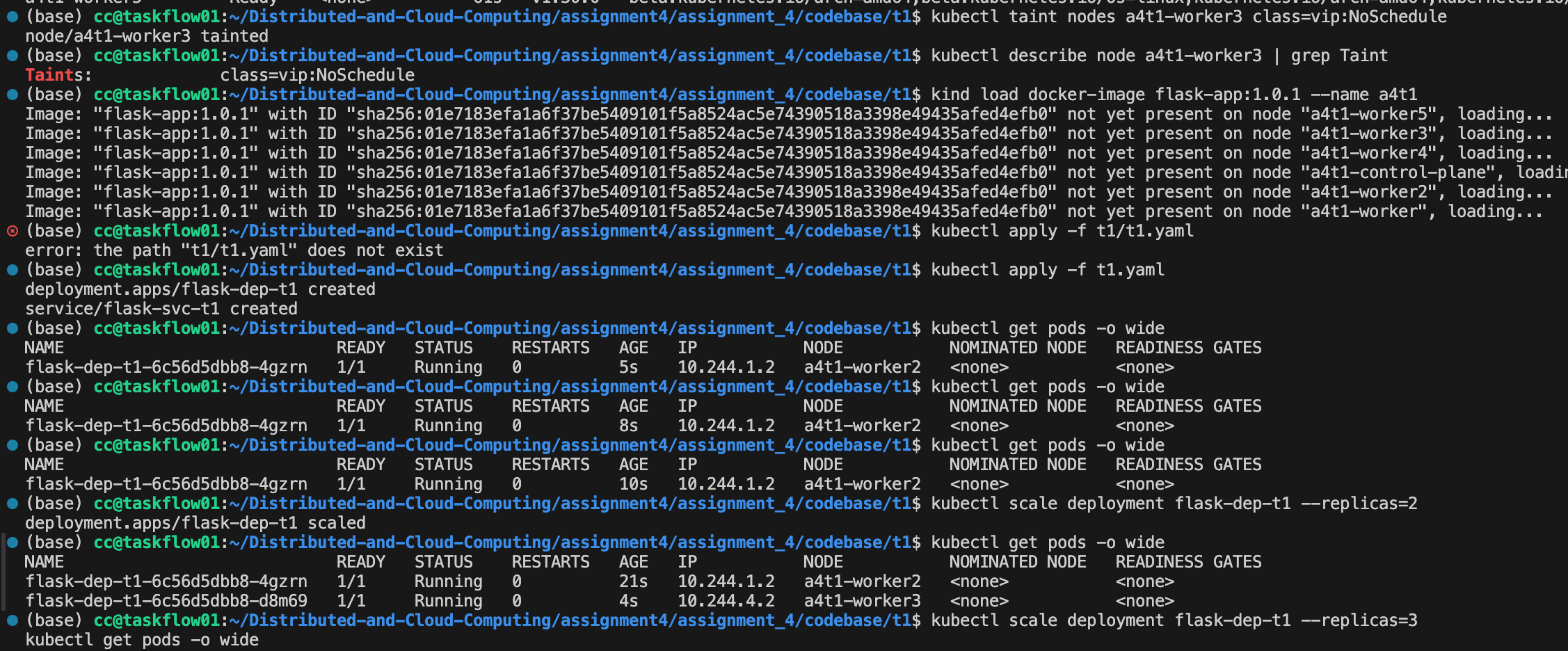
As I further increased the replica count to 3, 4, and finally 5, the new pods were scheduled onto the remaining worker nodes:
- The third pod was placed on
a4t1-worker(labeledusage=normal), - The fourth and fifth pods were placed on
a4t1-worker4anda4t1-worker5(both labeledusage=backup).
Throughout this process, the pod anti-affinity rule ensured that each replica was placed on a different node, so no twoflask-dep-t1pods share the same worker. Once all five replicas becameRunning, the final placement used all five worker nodes exactly once, respecting both the anti-affinity constraint and the node affinity preferences (powerful nodes first, then normal, and finally backup nodes), while the toleration allowed one pod to be scheduled on the tainted VIP nodea4t1-worker3.
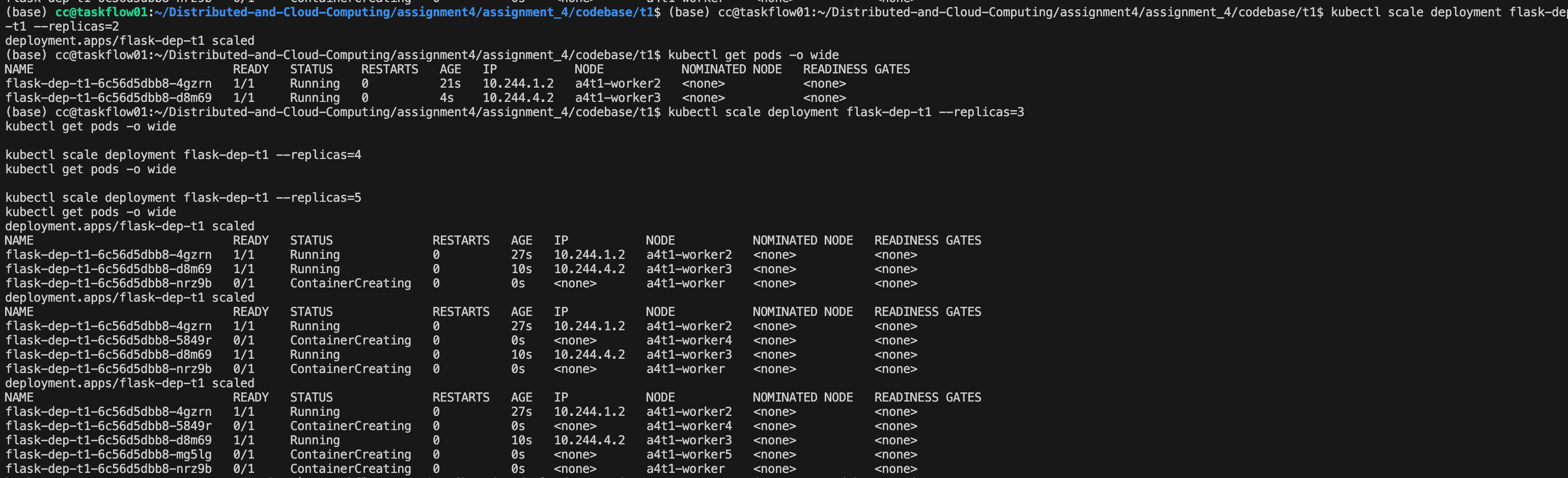
(as you can see, here we first have node3, then node1, node4 and lastly node5)
And just as we mentioned, if we don't add Tolerations rules, we can't add replica to node3.
Advice on Future Cloud Computing Lab
About MPI:
The tutorial is very good! If we can use some figures in Slides to show the algorithms of some communication primitives, that would be better.
The assignment 1 for MPI is good. But the matrix computation sizes is a little small. We can use larger matrix like 4096x4096.
I would like to share some of the workload if you want to make the assignment harder: implement a MPI-based parallel BFS algorithms. And there will be many ways to finish it. Also, try to use MPI to implement a Map Reduce would also be hard. Since there are problems like fault tolerance, large communication overhead, load imbalance etc. (That maybe too hard since it's like MIT 6.824)
we may introduce some of the communication library like NCCL, Kokkos. Some of the primitives use similar algorithms in MPI, like Ring-Allreduce.
About Stores:
The tutorial on GraphQL and OpenAPI is very good. I think the Lab did best on giving a tutorial to us!
Actually I'm pretty enjoy this assignments. Everything is very good. And in the lab we maybe can tell students to list the full API first. (I think during a Lab the TA said that, didn't they?)
We should add some benchmark tutorial in the Lab! (Like using hey to benchmark our website, that's fantastic)
About Spark:
The tutorial on Hadoop and Spark is very good. And the documents provided to us also very useful!
Some of the radical thought: maybe we can try to read the paper during the Lab. That would be amazing.
https://www.usenix.org/system/files/conference/nsdi12/nsdi12-final138.pdf
https://pages.cs.wisc.edu/~akella/CS838/F15/838-CloudPapers/hdfs.pdf
Amazing assignments. And it's really fun to analyze the data and get some conclusion on them. But it would be good if we can do some self checking to see if we are getting the right data.
About K8s:
Wonderful tutorial and assignments, since we are using K8s in industries.
And we can also give some deeper taste on Function as a Service. Try to use K8s to run a FaaS service. That would be cool!
Some of my learning records
I am also learning CSE5020 Advanced Distributed Systems this semester (just self-taking the class & self learning), and some of my recording is on my blog. Feel free to see them 🙂
https://www.haibinlaiblog.top/
I am also fascinated in recording everything I see during my studies, like papers, news, blogs, and some travel fun stories. It's really great to post them on a self learning space.