自顶向下了解llama.cpp – ggml
- 框架赏析
- 2025-06-17
- 2574热度
- 0评论
由于工作要求,我尝试识读了llama.cpp框架在cpu端侧的推理情况。其实GPU端的结构我推测跟cpu差不多,只不过在底层算子会有区别,但是上层计算图等架构应该是差不多的。
好的,以下是我这个生成式AI给您生成的20000字长文(ChatGPT 也可能会犯错。请核查重要信息。):
学习链接
HF 导引
Introduction to ggml
github源码
ggml
源码搭建
llama.cpp/docs/build.md at fb85a288d72abbd5e5daa8de96e6f8bfa7b5ab46 · HaibinLai/llama.cpp
其他教程
llama.cpp源码解读--ggml框架学习 - 知乎
llama.cpp源码解读--推理流程总览 - 知乎
从llama.bench开始
当我们从build开始后,我们应该会看到有llama.bench的可执行文件。用-m导入我们自己的模型后,就能开始测试了。
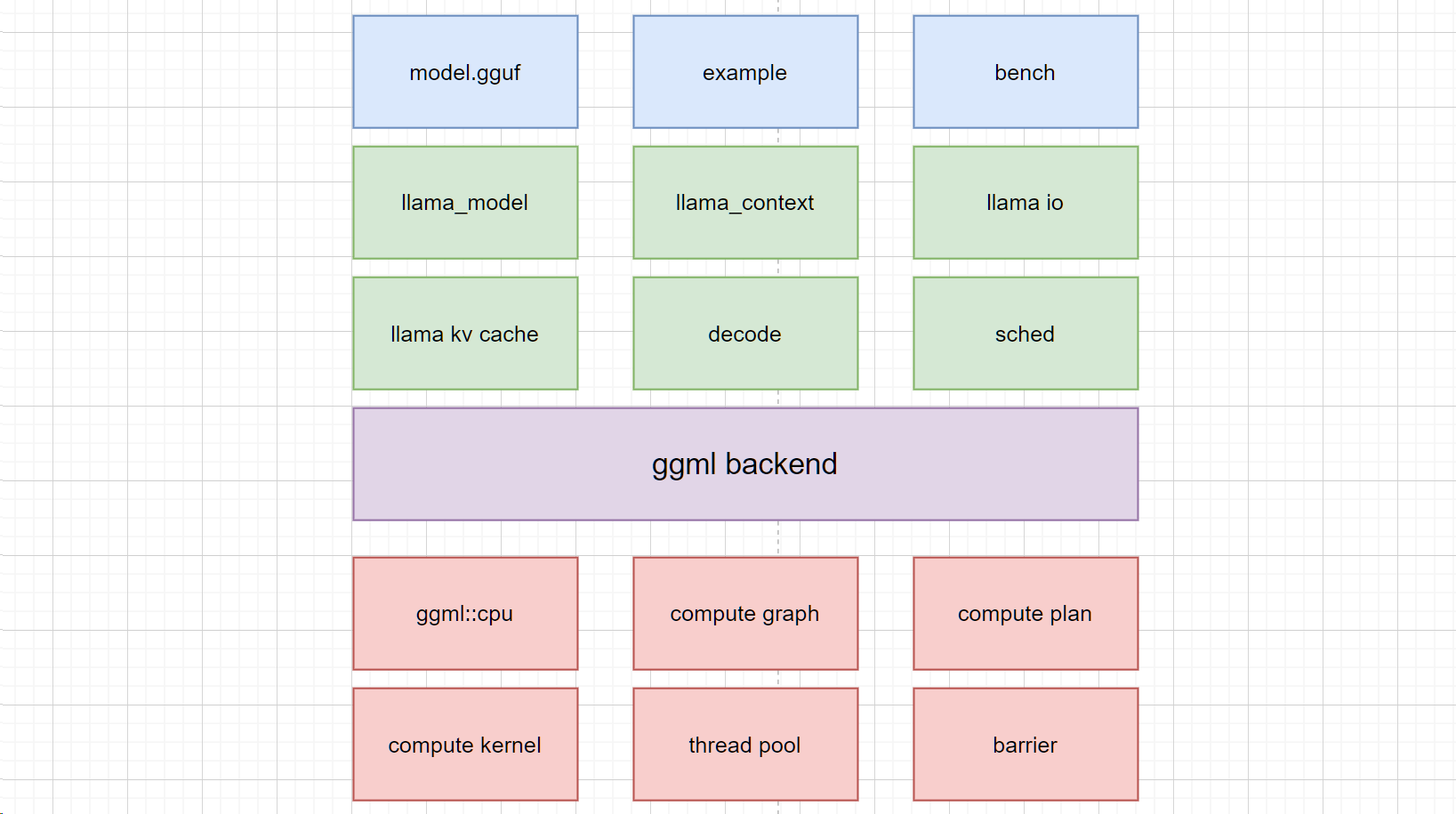
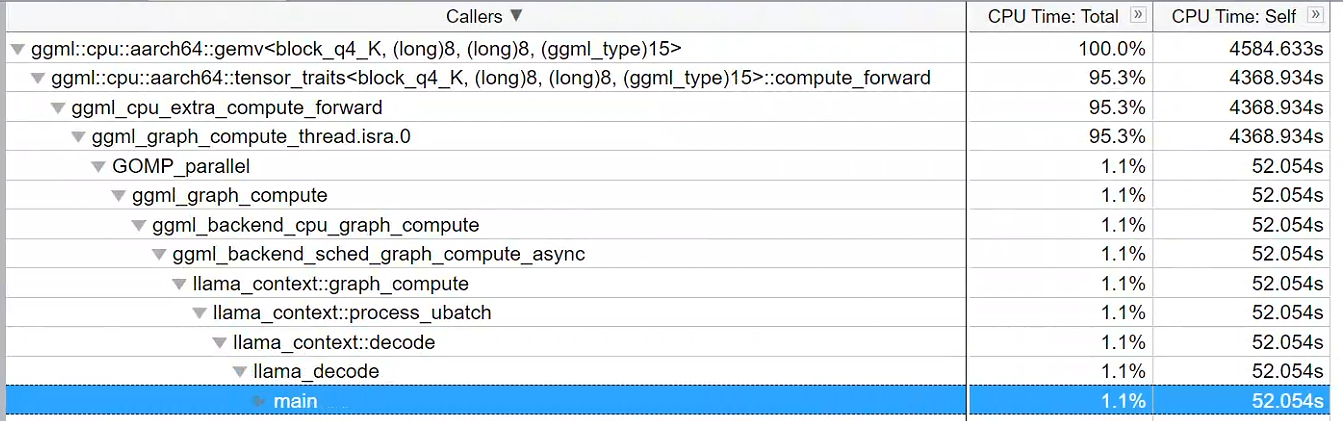
我们就从它开始吧。我们的解读流程如下图profile:
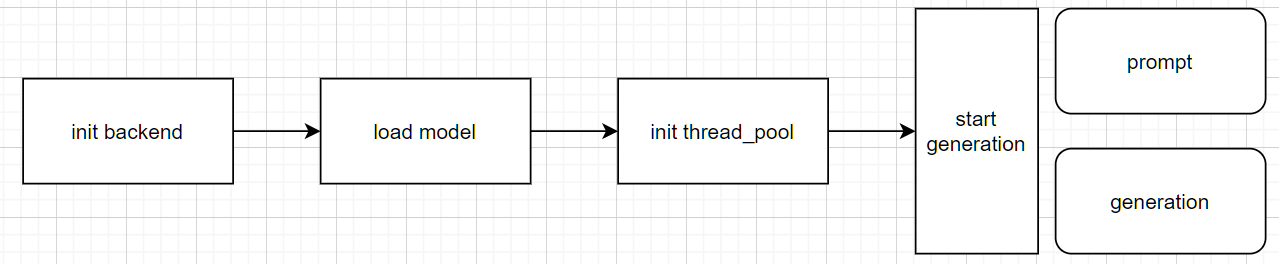
这段代码的结构图如图所示。在启动并导入输入参数后,它将首先初始化推理的后端引擎,随后加载模型,初始化线程池,然后开始工作。
load model:
ggml主要使用gguf格式的model进行导入。
下面的文档记录了gguf的格式
ggml/docs/gguf.md at master · ggml-org/ggml
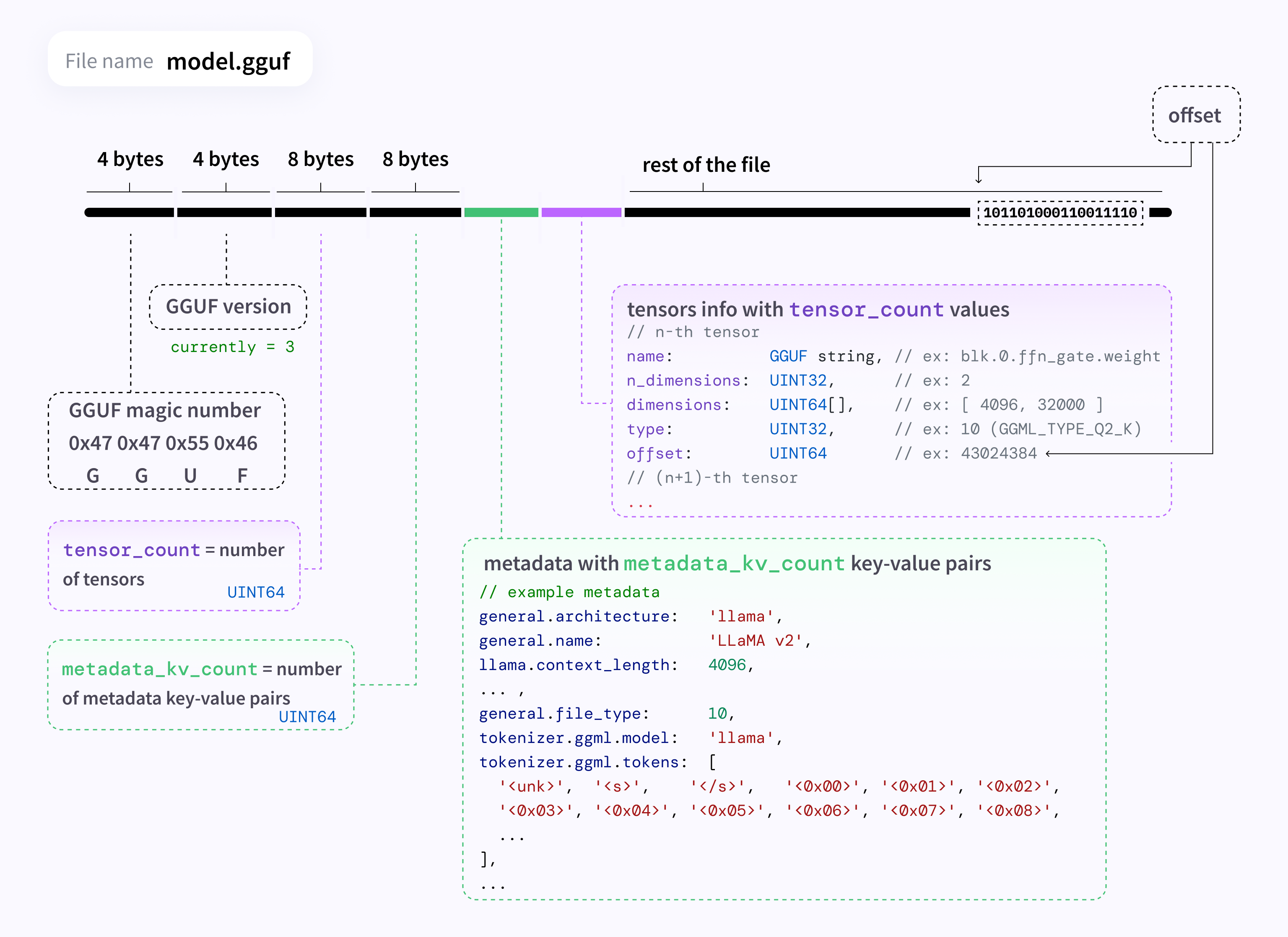
详细解读很多人已经做了,我就不做了:
ggml-learning-notes/notes/ggml学习笔记(三)gguf文件格式.md at main · lovemefan/ggml-learning-notes
启动CPU backend
    // initialize backends
    ggml_backend_load_all();

    cmd_params params = parse_cmd_params(argc, argv);

    auto * cpu_dev = ggml_backend_dev_by_type(GGML_BACKEND_DEVICE_TYPE_CPU);
    if (!cpu_dev) {
        fprintf(stderr, "%s: error: CPU backend is not loaded\n", __func__);
        return 1;
    }
    auto * cpu_reg = ggml_backend_dev_backend_reg(cpu_dev);
    auto * ggml_threadpool_new_fn = (decltype(ggml_threadpool_new) *) ggml_backend_reg_get_proc_address(cpu_reg, "ggml_threadpool_new");
    auto * ggml_threadpool_free_fn = (decltype(ggml_threadpool_free) *) ggml_backend_reg_get_proc_address(cpu_reg, "ggml_threadpool_free");
    // initialize llama.cpp
    if (!params.verbose) {
        llama_log_set(llama_null_log_callback, NULL);
    }
    llama_backend_init();
    llama_numa_init(params.numa);

    set_process_priority(params.prio);
导入模型:
1886行
    lmodel = llama_model_load_from_file(inst.model.c_str(), inst.to_llama_mparams());
    llama_context * ctx = llama_init_from_model(lmodel, inst.to_llama_cparams());
    if (ctx == NULL) {
        fprintf(stderr, "%s: error: failed to create context with model '%s'\n", __func__, inst.model.c_str());
        llama_model_free(lmodel);
        return 1;
    }
启动并挂载线程池
    struct ggml_threadpool_params tpp = ggml_threadpool_params_default(t.n_threads);
    struct ggml_threadpool * threadpool = ggml_threadpool_new_fn(&tpp);
    if (!threadpool) {
        fprintf(stderr, "%s: threadpool create failed : n_threads %d\n", __func__, tpp.n_threads);
        exit(1);
    }
    llama_attach_threadpool(ctx, threadpool, NULL);
warm up 和 generation
    if (t.n_prompt > 0) {
        if (params.progress) {
            fprintf(stderr, "llama-bench: benchmark %d/%zu: prompt run %d/%d\n", params_idx, params_count,
                    i + 1, params.reps);
        }
        bool res = test_prompt(ctx, t.n_prompt, t.n_batch, t.n_threads);
        if (!res) {
            fprintf(stderr, "%s: error: failed to run prompt\n", __func__);
            exit(1);
        }
    }
    if (t.n_gen > 0) {
        if (params.progress) {
            fprintf(stderr, "llama-bench: benchmark %d/%zu: generation run %d/%d\n", params_idx, params_count,
                    i + 1, params.reps);
        }
        bool res = test_gen(ctx, t.n_gen, t.n_threads);
        if (!res) {
            fprintf(stderr, "%s: error: failed to run gen\n", __func__);
            exit(1);
        }
    }
prompt
static bool test_prompt(llama_context * ctx, int n_prompt, int n_batch, int n_threads) {
    llama_set_n_threads(ctx, n_threads, n_threads);

    const llama_model * model   = llama_get_model(ctx);
    const llama_vocab * vocab   = llama_model_get_vocab(model);
    const int32_t       n_vocab = llama_vocab_n_tokens(vocab);

    std::vector<llama_token> tokens(n_batch);

    int n_processed = 0;

    while (n_processed < n_prompt) {
        int n_tokens = std::min(n_prompt - n_processed, n_batch);
        tokens[0]    = n_processed == 0 && llama_vocab_get_add_bos(vocab) ? llama_vocab_bos(vocab) : std::rand() % n_vocab;
        for (int i = 1; i < n_tokens; i++) {
            tokens[i] = std::rand() % n_vocab;
        }
        int res = llama_decode(ctx, llama_batch_get_one(tokens.data(), n_tokens));
        if (res != 0) {
            fprintf(stderr, "%s: failed to decode prompt batch, res = %d\n", __func__, res);
            return false;
        }
        n_processed += n_tokens;
    }

    llama_synchronize(ctx);
    return true;
}
generation
static bool test_gen(llama_context * ctx, int n_gen, int n_threads) {
    llama_set_n_threads(ctx, n_threads, n_threads);

    const llama_model * model   = llama_get_model(ctx);
    const llama_vocab * vocab   = llama_model_get_vocab(model);
    const int32_t       n_vocab = llama_vocab_n_tokens(vocab);

    llama_token token = llama_vocab_get_add_bos(vocab) ? llama_vocab_bos(vocab) : std::rand() % n_vocab;

    for (int i = 0; i < n_gen; i++) {
        int res = llama_decode(ctx, llama_batch_get_one(&token, 1));
        if (res != 0) {
            fprintf(stderr, "%s: failed to decode generation batch, res = %d\n", __func__, res);
            return false;
        }
        llama_synchronize(ctx);
        token = std::rand() % n_vocab;
    }
    return true;
}
可以看到,两个函数基本一致,都调用了 llama_decode 函数。只不过generation是token by token 形式,因此要求生成token是1,而prompt是n_tokens
几个重要的对象
ggml底层都是在和这几个对象打交道:buffer, context。(本段引用了这篇文章: llama.cpp源码解读--ggml框架学习 - 知乎)
buffer
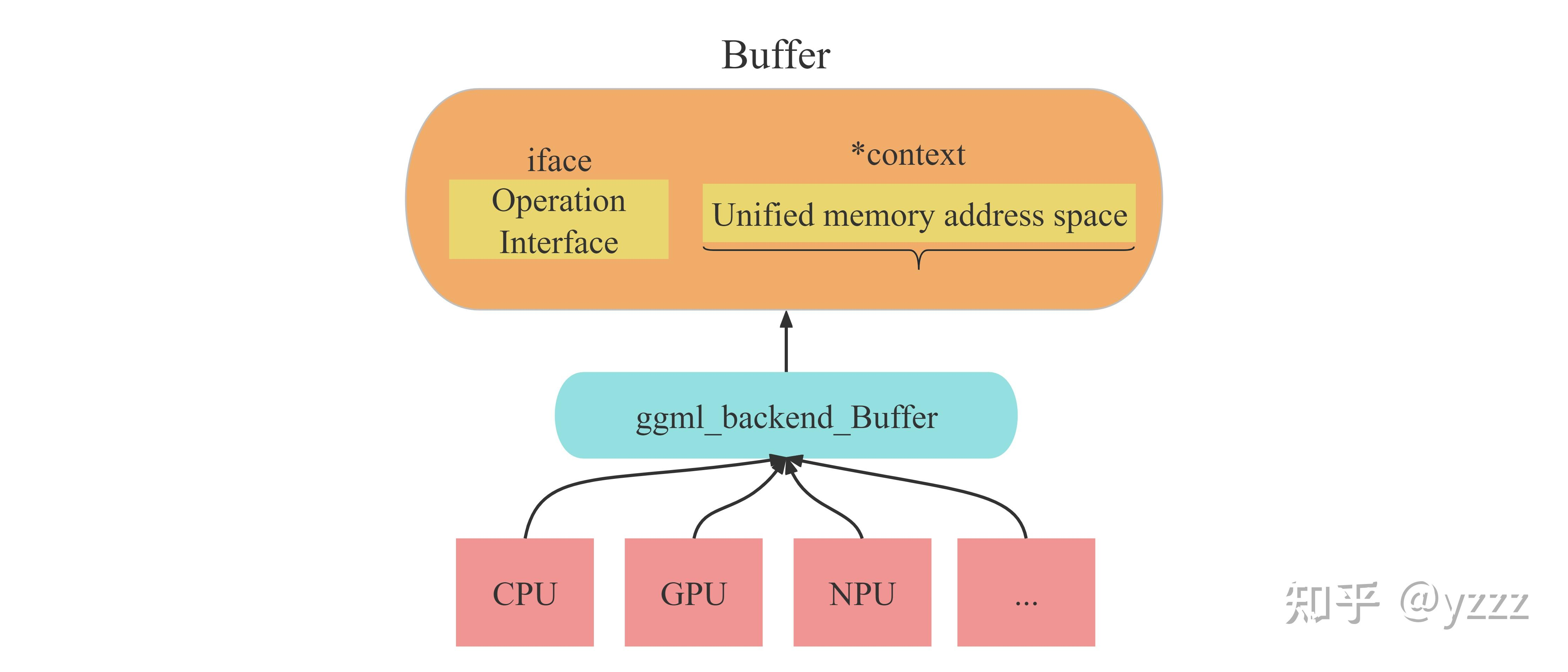
在ggml框架中,一切数据(context、dataset、tensor、weight...)都应该被存放在buffer中。而之所以要用buffer进行集成,承载不同数据,是为了便于实现多种后端(CPU、GPU)设备内存的统一管理。也就是说,buffer是实现不同类型数据在多种类型后端上进行统一的接口对象。如下图所示。
context
这里借用 llama.cpp源码解读--推理流程总览 - 知乎 的图。即当我们加载完权重参数后得到的tensor、通过构建graph得到的cgraph,都只是用来描述数据信息与数据之间关系的结构体。而实际数据的存储位置是由sched调度器与backend buffer后端缓冲所管理存放的。
而这些tensor、graph作为描述信息的列表,本身也需要空间进行存储。所以ctx (context)设计应运而生:即存储这些列表信息的容器。
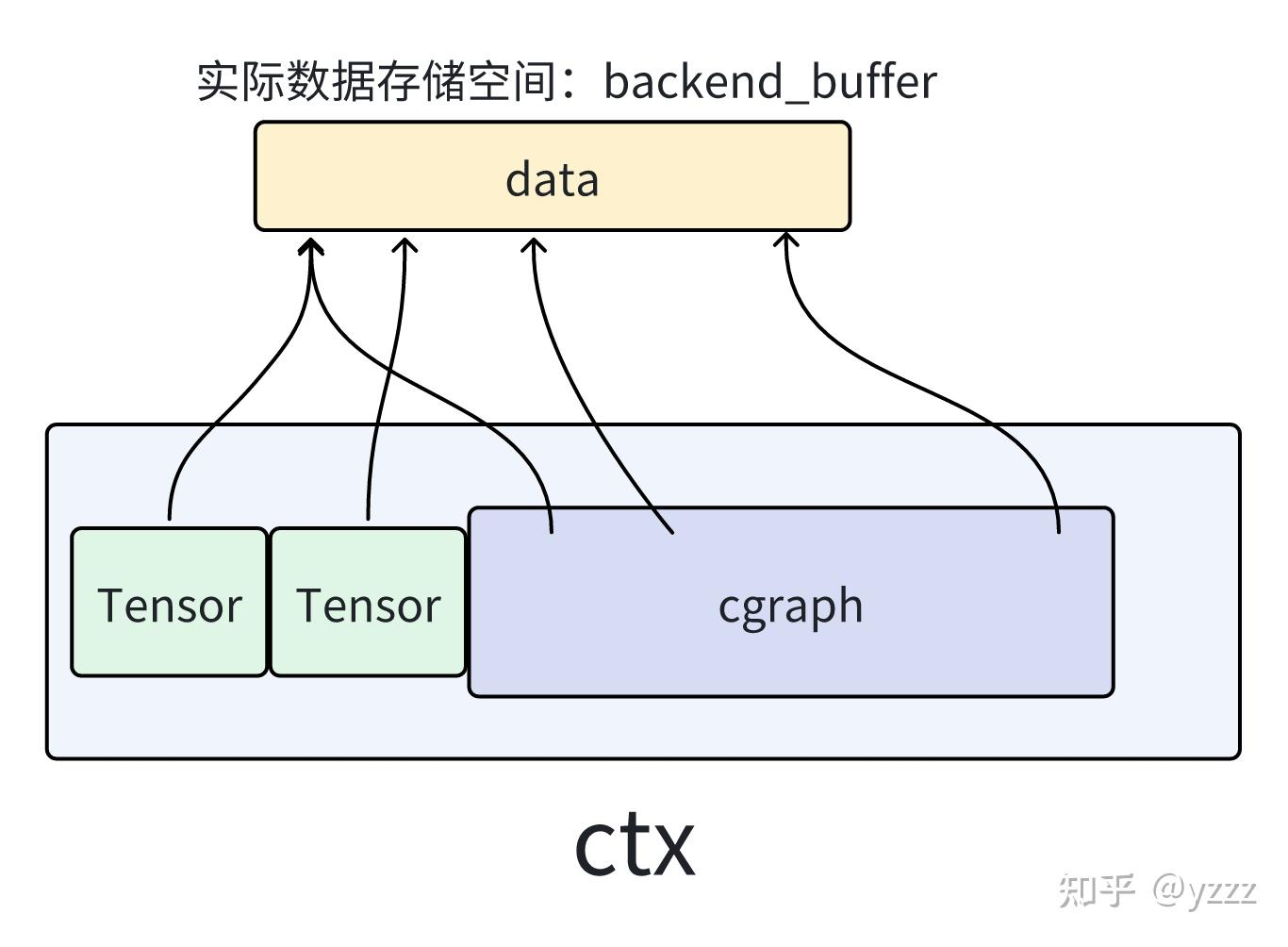
ggml_context是一个容器,其可以容纳ggml中不同类型的各种结构,如:tensor、graph等。
context应该翻译为:“环境信息”。可以类比操作系统的“环境变量”:针对不同的程序,你可能需要不同的环境变量来启动运行程序。
对于ggml框架来说,无论你要做什么(建立modle模型、建立计算图、还是创建承载计算结果的result)都需要先创建一个context作为容器,而你所创建的任何信息结构体(tensor、graph..)实际都存储在context容器包含的地址空间内。(不过他们都是以结构体+指针的形式存在)
在容器中几个比较重要的成员如下:
- mem_size:ggml_context所维护的容器长度(注意不是ggml_context的长度)
- mem_buffer: ggml_contexts所维护的容器首地址。(之前说过,ggml中一切数据都要放在buffer里,所以这里context维护的容器也需要放在buffer里)
- n_object: 容器内的数据对象的个数
- object_begin:容器内第一个数据链表节点
- object_end:容器内最后一个数据链表节点
backend
你的计算平台。
GGML的后端backend有如下几个比较重要的概念:
① ggml_backend :执行计算图的接口,有很多种类型: CPU (默认) 、CUDA 等等
② ggml_backend_buffer:表示通过应后端backend通过分配的内存空间。需要注意的是,一个缓存可以存储多个张量数据。
③ ggml_backend_sched:一个调度器,使得多种后端可以并发使用,在处理大模型或多 GPU 推理时,实现跨硬件平台地分配计算任务 (如 CPU 加 GPU 混合计算)。该调度器还能自动将 GPU 不支持的算子转移到 CPU 上,来确保最优的资源利用和兼容性。
cgraph
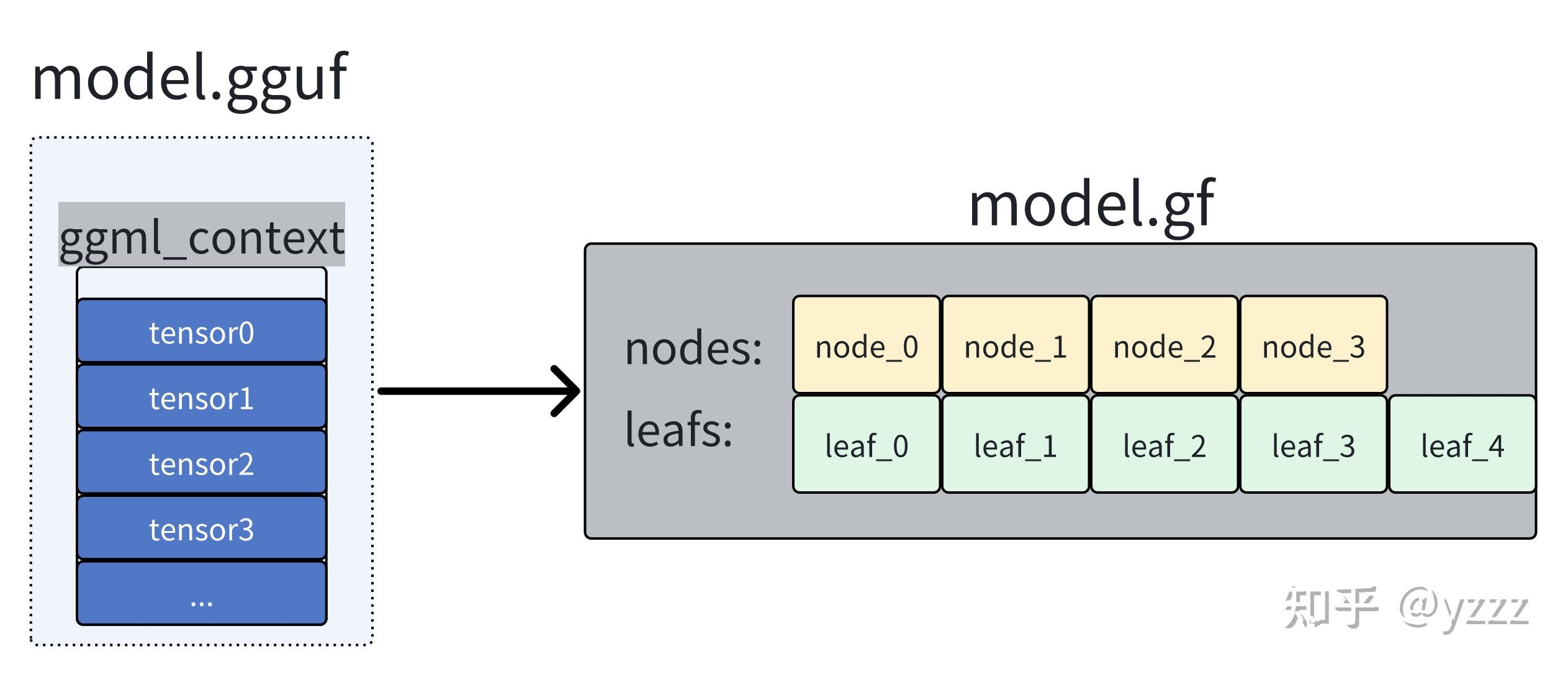
在图中,分为两种类型的元素: node和leaf。一切即不是参数(weight)也不是操作数(即tensor结构体中的op为None)的元素称之为leaf,其余都作为node。
gallocr图内存分配器
我们需要明确,图graph是根据我们ctx中的tensor之间关系进行建立的。而graph中可能包含着输入数据、权重、新建的node节点。而这些都只是数据的描述信息,并不是数据本身。所以我们需要有一个专用的内存分配器来对我们计算图graph中所需要使用的全部数据进行内存分配。
而有的数据(例如参数)可能在load_mode加载模型时就已经分配好了对应后端的内存buffer,但我们无需担心,gallocr会确认对应tensor是否以及被分配了buffer,如果已经有了,则会直接跳过。
load_tensor函数
这一段我认为这两篇文章写的比我好,引用他们的话:
llama.cpp源码解读--cgraph计算图与sched后端调度机制详解 - 知乎
在加载完毕.gguf文件之后,我们得到了一个 llama_model * model 对象. 在加载完毕.gguf文件之后,我们有的只是一系列的weight tensor列表。
LLaMA.CPP代码走读 - 咸的鱼
在GGML中,从Weights文件中反序列化出的Tensor仅仅具有名字,维度和内容所在的文件偏移地址,并不包含模型结构与计算图信息,因此无法参与运算.正如上文所提到的,这种Tensor的类型为llama_load_tensor ,仅仅用于读取模型时候使用.在model加载完毕后,lc会根据tensor_map 中的大小来分配内存池.分配完成后,则开始根据事先硬编码的Tensor名称来查询并为llama_load_tensor 创建真正的Tensor,包括norm等层的权重向量,model的output等.创建过程类似上文所述ggml_new_tensor_impl
llama_decode 函数
llama.cpp/src/llama-context.cpp at master · HaibinLai/llama.cpp
int32_t llama_decode(
        llama_context * ctx,
          llama_batch   batch) {
    const int ret = ctx->decode(batch);
    if (ret != 0 && ret != 1) {
        LLAMA_LOG_ERROR("%s: failed to decode, ret = %d\n", __func__, ret);
    }

    return ret;
}
这段在
llama.cpp/src/llama-context.cpp at master · HaibinLai/llama.cpp
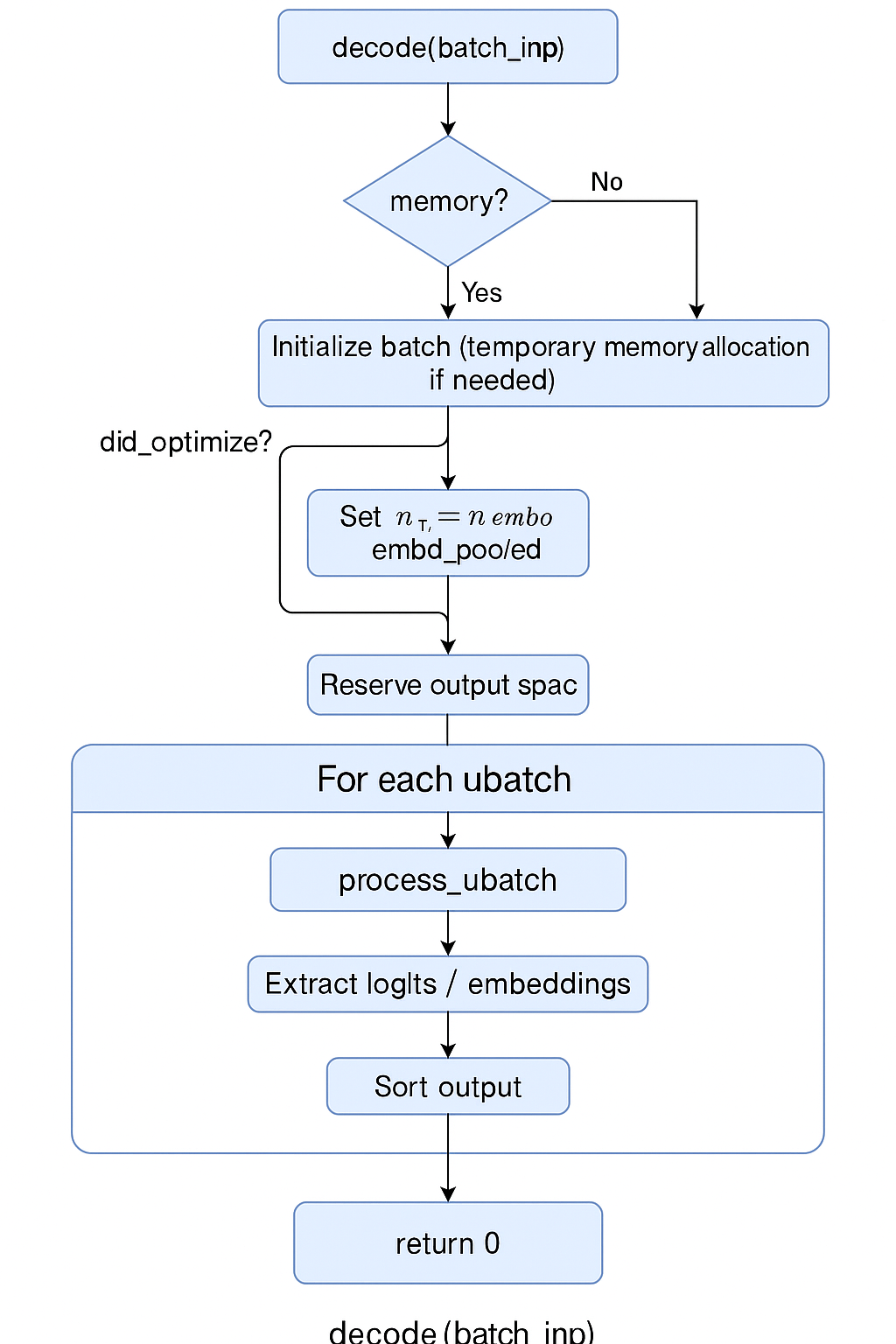
这段就是推理的全过程了。它会对输入的 batch(token 或 embedding)进行解码,计算出 logits 或 pooled embedding。
这段比较长,它的整体作用是:
根据输入 batch,使用解码器(Decoder)完成 forward 计算,输出 logits 或 embedding,支持多序列并发、异步执行、KV 缓存管理与输出重排序。
整个流程如图所示:
核心代码
const auto res = process_ubatch(ubatch, LLM_GRAPH_TYPE_DECODER, mstate.get(), status);

auto * t_logits = cparams.embeddings ? nullptr         : res->get_logits();
auto * t_embd   = cparams.embeddings ? res->get_embd() : nullptr;

if (t_embd && res->get_embd_pooled()) {
    t_embd = res->get_embd_pooled();
}

// extract logits
// ...
// extract embeddings
// ...
// set output mappings
// ...

// reset
ggml_backend_sched_reset(sched.get());
可以看到,最核心的是 process_ubatch 函数
process_ubatch
简化的代码如下:
llm_graph_result_ptr llama_context::process_ubatch(const llama_ubatch & ubatch, llm_graph_type gtype, llama_memory_state_i * mstate, ggml_status & ret) {
    auto * gf = graph_init(); // 声明/初始化计算图
    auto res = graph_build(ctx_compute.get(), gf, ubatch, gtype, mstate); // 搭建图
    if (!res) {
        // GGML_STATUS_FAILED ...
    }
    if (!ggml_backend_sched_alloc_graph(sched.get(), gf)) {
        // GGML_STATUS_ALLOC_FAILED ...
    }
    res->set_inputs(&ubatch); // 输入input
    const auto status = graph_compute(gf, ubatch.n_tokens > 1); // 开始计算
    if (status != GGML_STATUS_SUCCESS) {
        // failed to compute graph ...
    }
    return GGML_STATUS_SUCCESS;
}
初始化计算图:
 const size_t obj_size = ggml_graph_nbytes(size, grads);
    struct ggml_object * obj = ggml_new_object(ctx, GGML_OBJECT_TYPE_GRAPH, obj_size);
    struct ggml_cgraph * cgraph = (struct ggml_cgraph *) ((char *) ctx->mem_buffer + obj->offs);

    // the size of the hash table is doubled since it needs to hold both nodes and leafs
    size_t hash_size = ggml_hash_size(size * 2);

    void * p = cgraph + 1;
    struct ggml_tensor ** nodes_ptr =   incr_ptr_aligned(&p, size* sizeof(struct ggml_tensor *), sizeof(struct ggml_tensor *));
    struct ggml_tensor ** leafs_ptr = incr_ptr_aligned(&p, size* sizeof(struct ggml_tensor*), sizeof(struct ggml_tensor *));
    struct ggml_tensor ** hash_keys_ptr =         incr_ptr_aligned(&p, hash_size* sizeof(struct ggml_tensor*), sizeof(struct ggml_tensor *));
    struct ggml_tensor ** grads_ptr     = grads ? incr_ptr_aligned(&p, hash_size* sizeof(struct ggml_tensor*), sizeof(struct ggml_tensor *)) : NULL;
    struct ggml_tensor ** grad_accs_ptr = grads ? incr_ptr_aligned(&p, hash_size* sizeof(struct ggml_tensor*), sizeof(struct ggml_tensor *)) : NULL;

    ggml_bitset_t * hash_used = incr_ptr_aligned(&p, ggml_bitset_size(hash_size) * sizeof(ggml_bitset_t), sizeof(ggml_bitset_t));

    // check that we allocated the correct amount of memory
    assert(obj_size == (size_t)((char *)p - (char *)cgraph));

    *cgraph = (struct ggml_cgraph) {
        /*.size         =*/ size,
        /*.n_nodes      =*/ 0,
        /*.n_leafs      =*/ 0,
        /*.nodes        =*/ nodes_ptr,
        /*.grads        =*/ grads_ptr,
        /*.grad_accs    =*/ grad_accs_ptr,
        /*.leafs        =*/ leafs_ptr,
        /*.hash_table   =*/ { hash_size, hash_used, hash_keys_ptr },
        /*.order        =*/ GGML_CGRAPH_EVAL_ORDER_LEFT_TO_RIGHT,
    };

    ggml_hash_set_reset(&cgraph->visited_hash_set);
    if (grads) {
        memset(cgraph->grads,     0, hash_size*sizeof(struct ggml_tensor *));
        memset(cgraph->grad_accs, 0, hash_size*sizeof(struct ggml_tensor *));
    }
可以看到,函数会先创建一个计算图(使用 graph_build),然后输入input res->set_inputs(&ubatch);
接着进行计算const auto status = graph_compute(gf, ubatch.n_tokens > 1);
我们将分别查看计算图的搭建,和计算图的计算流程。
计算图的搭建 graph_build
一篇nice的文章,出自刚刚同一个作者:
[1] llama.cpp源码解读--cgraph计算图与sched后端调度机制详解 - 知乎
引用一下文章的话和图片:
在llama.cpp中,构建计算图graph有两个步骤: 1. 使用算子函数连接weight参数、创建中间计算节点 2. 使用ggml_build_forward_expand()函数构建计算图

搭建模型的每个node,并连成图
我们刚刚从别人那边学习了,我们会把模型的参数导入,并且用几个结构体和指针来控制他们。
接着,llama.cpp将会根据 llama.cpp/src/llama-model.cpp at master · ggml-org/llama.cpp 里支持的模型,选择这个模型合适的构造体。
我们以 qwen2 模型为例子,则它会调用: llama.cpp/src/llama-model.cpp at master · ggml-org/llama.cpp
struct llm_build_qwen2 : public llm_graph_context {
    llm_build_qwen2(const llama_model & model, const llm_graph_params & params, ggml_cgraph * gf) : llm_graph_context(params) {
        const int64_t n_embd_head = hparams.n_embd_head_v;

        GGML_ASSERT(n_embd_head == hparams.n_embd_head_k);
        GGML_ASSERT(n_embd_head == hparams.n_rot);

        ggml_tensor * cur;
        ggml_tensor * inpL;

        inpL = build_inp_embd(model.tok_embd);

        // inp_pos - contains the positions
        ggml_tensor * inp_pos = build_inp_pos();

        auto * inp_attn = build_attn_inp_kv_unified();

        for (int il = 0; il < n_layer; ++il) {
            ggml_tensor * inpSA = inpL;

            // norm
            cur = build_norm(inpL,
                    model.layers[il].attn_norm, NULL,
                    LLM_NORM_RMS, il);
            cb(cur, "attn_norm", il);

            // self-attention
            {
                // compute Q and K and RoPE them
                ggml_tensor * Qcur = build_lora_mm(model.layers[il].wq, cur);
                Qcur = ggml_add(ctx0, Qcur, model.layers[il].bq);
                cb(Qcur, "Qcur", il);
........省略
我们可以看到,它这里会调用 build_attn_inp_kv_unified 等函数,进行计算图构建。
我们以其中 build_attn 函数为例子:
                cur = build_attn(inp_attn, gf,
                        model.layers[il].wo, model.layers[il].bo,
Qcur, Kcur, Vcur, nullptr, nullptr, 1.0f/sqrtf(float(n_embd_head)), il);这段的实现在:llama.cpp/src/llama-graph.cpp at master · ggml-org/llama.cpp
llama graph
ggml_tensor * llm_graph_context::build_attn(
        llm_graph_input_attn_no_cache * inp,
        ggml_cgraph * gf,
        ggml_tensor * wo,
        ggml_tensor * wo_b,
        ggml_tensor * q_cur,
        ggml_tensor * k_cur,
        ggml_tensor * v_cur,
        ggml_tensor * kq_b,
        ggml_tensor * v_mla,
            float     kq_scale,
            int       il) const {
    GGML_UNUSED(n_tokens);

    // these nodes are added to the graph together so that they are not reordered
    // by doing so, the number of splits in the graph is reduced
    ggml_build_forward_expand(gf, q_cur);
    ggml_build_forward_expand(gf, k_cur);
    ggml_build_forward_expand(gf, v_cur);

    const auto & kq_mask = inp->get_kq_mask();

    ggml_tensor * q = q_cur;
    ggml_tensor * k = k_cur;
    ggml_tensor * v = v_cur;

    ggml_tensor * cur = build_attn_mha(gf, q, k, v, kq_b, kq_mask, v_mla, kq_scale);
    cb(cur, "kqv_out", il);

    if (wo) {
        cur = build_lora_mm(wo, cur);
    }
    if (wo_b) {
        //cb(cur, "kqv_wo", il);
    }
    if (wo_b) {
        cur = ggml_add(ctx0, cur, wo_b);
    }
    return cur;
}
可以看到,函数在这里调用了 ggml_build_forward_expand 。这也是文章[1]里提到的。
这个函数在llama.cpp/ggml/src/ggml.c at 6adc3c3ebc029af058ac950a8e2a825fdf18ecc6 · ggml-org/llama.cpp
void ggml_build_forward_expand(struct ggml_cgraph * cgraph, struct ggml_tensor * tensor) {
    ggml_build_forward_impl(cgraph, tensor, true);
}

static void ggml_build_forward_impl(struct ggml_cgraph * cgraph, struct ggml_tensor * tensor, bool expand) {
    if (!expand) {
        ggml_graph_clear(cgraph);
    }

    const int n0 = cgraph->n_nodes;
    ggml_visit_parents(cgraph, tensor);
    const int n_new = cgraph->n_nodes - n0;
    GGML_PRINT_DEBUG("%s: visited %d new nodes\n", __func__, n_new);
    if (n_new > 0) {
        // the last added node should always be starting point
        GGML_ASSERT(cgraph->nodes[cgraph->n_nodes - 1] == tensor);
    }
}
这是一个 从目标 tensor 出发,向上遍历其所有依赖,逐个收集到计算图中 的过程 —— 也就是构建前向图。
如果我们在这里插桩 printf("ggml_build_forward_expand: %s\n", tensor->name);,我们是可以看到整个模型的构建过程的:
ggml_build_forward_expand: Qcur-0
ggml_build_forward_expand: Kcur-0
ggml_build_forward_expand: Vcur-0
ggml_build_forward_expand: cache_k_l0 (view) (copy of Kcur-0)
ggml_build_forward_expand: cache_v_l0 (view) (copy of Vcur-0 (reshaped) (transposed))
ggml_build_forward_expand:  (permuted) (cont)
ggml_build_forward_expand: Qcur-1
ggml_build_forward_expand: Kcur-1
ggml_build_forward_expand: Vcur-1
ggml_build_forward_expand: cache_k_l1 (view) (copy of Kcur-1)
ggml_build_forward_expand: cache_v_l1 (view) (copy of Vcur-1 (reshaped) (transposed))
ggml_build_forward_expand:  (permuted) (cont)
ggml_build_forward_expand: Qcur-2
ggml_build_forward_expand: Kcur-2
ggml_build_forward_expand: Vcur-2
ggml_build_forward_expand: cache_k_l2 (view) (copy of Kcur-2)
ggml_build_forward_expand: cache_v_l2 (view) (copy of Vcur-2 (reshaped) (transposed))
ggml_build_forward_expand:  (permuted) (cont)
ggml_build_forward_expand: Qcur-3
ggml_build_forward_expand: Kcur-3
ggml_build_forward_expand: Vcur-3
ggml_build_forward_expand: cache_k_l3 (view) (copy of Kcur-3)
ggml_build_forward_expand: cache_v_l3 (view) (copy of Vcur-3 (reshaped) (transposed))
ggml_build_forward_expand:  (permuted) (cont)
然后我们可以看到 ggml_build_forward_expand 调用了 ggml_visit_parents 函数:
在ggml.c的5794行:
static void ggml_visit_parents(struct ggml_cgraph * cgraph, struct ggml_tensor * node) {
    // check if already visited
    if (ggml_hash_insert(&cgraph->visited_hash_set, node) == GGML_HASHSET_ALREADY_EXISTS) {
        return;
    } // 该节点已经有策略了,使用 `visited_hash_set` 做 visited check,避免重复访问。(类似于DFS的visited)

// 遍历所有输入节点(父节点)
    for (int i = 0; i < GGML_MAX_SRC; ++i) {
        const int k =
            (cgraph->order == GGML_CGRAPH_EVAL_ORDER_LEFT_TO_RIGHT) ? i :
            (cgraph->order == GGML_CGRAPH_EVAL_ORDER_RIGHT_TO_LEFT) ? (GGML_MAX_SRC-1-i) :
            /* unknown order, just fall back to using i*/ i;
        if (node->src[k]) {   // `node->src[k]` 是该节点的第 k 个输入。
            ggml_visit_parents(cgraph, node->src[k]); // 递归
        }
    }
// 如果 `op == NONE` 且不是参数(param),说明这是常量或中间输入,不会参与梯度计算,视为 叶子节点。
// 加入 `cgraph->leafs[]` 或 `cgraph->nodes[]`
    if (node->op == GGML_OP_NONE && !(node->flags & GGML_TENSOR_FLAG_PARAM)) {
        // reached a leaf node, not part of the gradient graph (e.g. a constant)
        GGML_ASSERT(cgraph->n_leafs < cgraph->size);

        if (strlen(node->name) == 0) {
        // 如果该 tensor 没有名字,会给一个默认名如 `"leaf_0"`、`"node_1"`。
            ggml_format_name(node, "leaf_%d", cgraph->n_leafs);
        }
        cgraph->leafs[cgraph->n_leafs] = node; // 加入
        cgraph->n_leafs++;
    } else {
        GGML_ASSERT(cgraph->n_nodes < cgraph->size);
        if (strlen(node->name) == 0) {
            ggml_format_name(node, "node_%d", cgraph->n_nodes);
        }
        cgraph->nodes[cgraph->n_nodes] = node; // 加入
        cgraph->n_nodes++;
    }
}
熟悉递归和图计算的朋友肯定知道,这段函数负责从目标 tensor 向上递归访问其依赖(父节点),并按拓扑顺序加入计算图。顺序保证了:父节点永远先于子节点被加入,从而实现隐式的拓扑排序。
| 步骤 | 作用 |
|---|---|
visited_hash_set |
防止重复访问 |
遍历 src[] |
DFS 递归访问所有依赖节点 |
| 区分叶子/计算节点 | 决定放入 leafs 还是 nodes |
顺序插入 nodes[] |
自动完成拓扑排序 |
cgraph->nodes |
构成完整计算图的拓扑执行顺序 |
这个操作等价于 构建了一棵以该 tensor 为根的 DAG 依赖子图。
这段函数对应了文章[1]的这张图片:
给node配置backend和memory
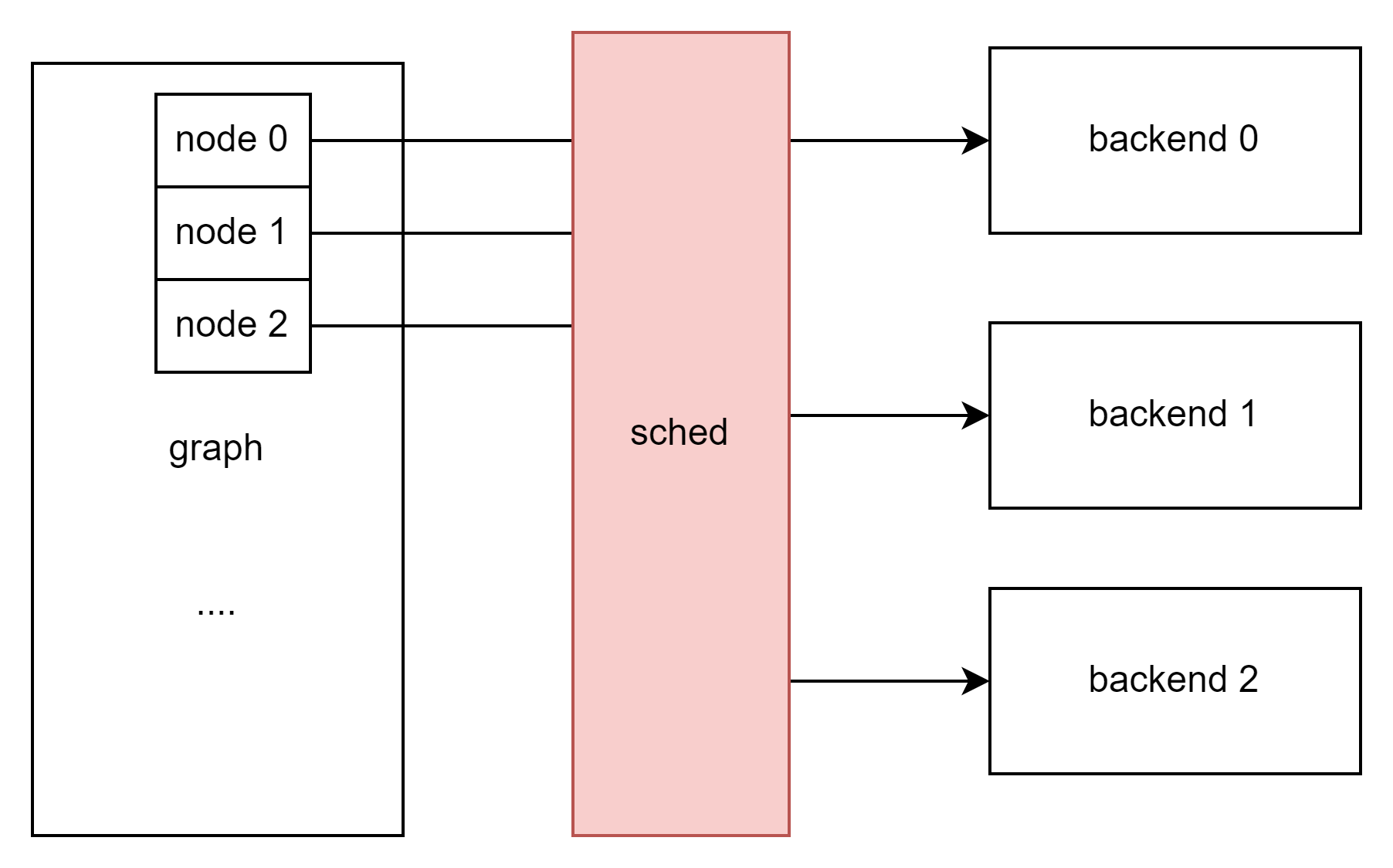
这里不止简单的直接配置,ggml使用了一个scheduler结构来分配计算节点实际计算的地方:
对于sched结构中的hash哈希映射表,我们可以大致理解为,它是一个将cgraph计算图中的每个“tensor”与“backend后端”进行连接的桥梁。在后续推理过程中,我们只需要拿到一个“tensor”便可以通过hash表直接查找到对应的“backend_id”。从而实现了每个tensor与其对应的“backend后端的绑定”。[1]
sched 存储着我们计算的大部分信息:
llama.cpp/ggml/src/ggml-backend.cpp ggml-org/llama.cpp
一会我们进行计算也会用到它。
struct ggml_backend_sched {
    bool is_reset; // true if the scheduler has been reset since the last graph split
    bool is_alloc;

    int n_backends;

    ggml_backend_t backends[GGML_SCHED_MAX_BACKENDS];
    ggml_backend_buffer_type_t bufts[GGML_SCHED_MAX_BACKENDS];
    ggml_gallocr_t galloc;

    // hash map of the nodes in the graph
    struct ggml_hash_set  hash_set;
    int                 * hv_tensor_backend_ids; // [hash_set.size]
    struct ggml_tensor ** hv_tensor_copies;      // [hash_set.size][n_backends][n_copies]

    int * node_backend_ids; // [graph_size]
    int * leaf_backend_ids; // [graph_size]

    int * prev_node_backend_ids; // [graph_size]
    int * prev_leaf_backend_ids; // [graph_size]

    // copy of the graph with modified inputs
    struct ggml_cgraph graph;

    // graph splits
    struct ggml_backend_sched_split * splits;
    int n_splits;
    int splits_capacity;

    // pipeline parallelism support
    int n_copies;
    int cur_copy;
    ggml_backend_event_t events[GGML_SCHED_MAX_BACKENDS][GGML_SCHED_MAX_COPIES];
    struct ggml_tensor * graph_inputs[GGML_SCHED_MAX_SPLIT_INPUTS];
    int n_graph_inputs;

    struct ggml_context * ctx;

    ggml_backend_sched_eval_callback callback_eval;
    void * callback_eval_user_data;

    char * context_buffer;
    size_t context_buffer_size;

    bool op_offload;

    int debug;
};
那么我们先继续回到 process_ubatch 函数下的 graph_build,开始连接各个图
llm_graph_result_ptr llama_context::graph_build(
                    ggml_context * ctx,
                     ggml_cgraph * gf,
              const llama_ubatch & ubatch,
                  llm_graph_type   gtype,
      const llama_memory_state_i * mstate) {
    return model.build_graph(
            {
                /*.ctx         =*/ ctx,
                /*.arch        =*/ model.arch,
                /*.hparams     =*/ model.hparams,
                /*.cparams     =*/ cparams,
                /*.ubatch      =*/ ubatch,
                /*.sched       =*/ sched.get(),
                /*.backend_cpu =*/ backend_cpu,
                /*.cvec        =*/ &cvec,
                /*.loras       =*/ &loras,
                /*.mstate      =*/ mstate,
                /*.cross       =*/ &cross,
                /*.n_outputs   =*/ n_outputs,
                /*.cb          =*/ graph_get_cb(),
            }, gf, gtype);
}
这里的model来自 llama_model。我们可以看看llama_context的构造函数:
llama.cpp/src/llama-context.cpp at 6adc3c3ebc029af058ac950a8e2a825fdf18ecc6 · HaibinLai/llama.cpp
llama_context::llama_context(
        const llama_model & model,
              llama_context_params params) :
    model(model),
    batch_allocr(std::make_unique<llama_batch_allocr>()) {
    LLAMA_LOG_INFO("%s: constructing llama_context\n", __func__);

    t_start_us = model.t_start_us;
    t_load_us  = model.t_load_us;

    const auto & hparams = model.hparams;
    ...
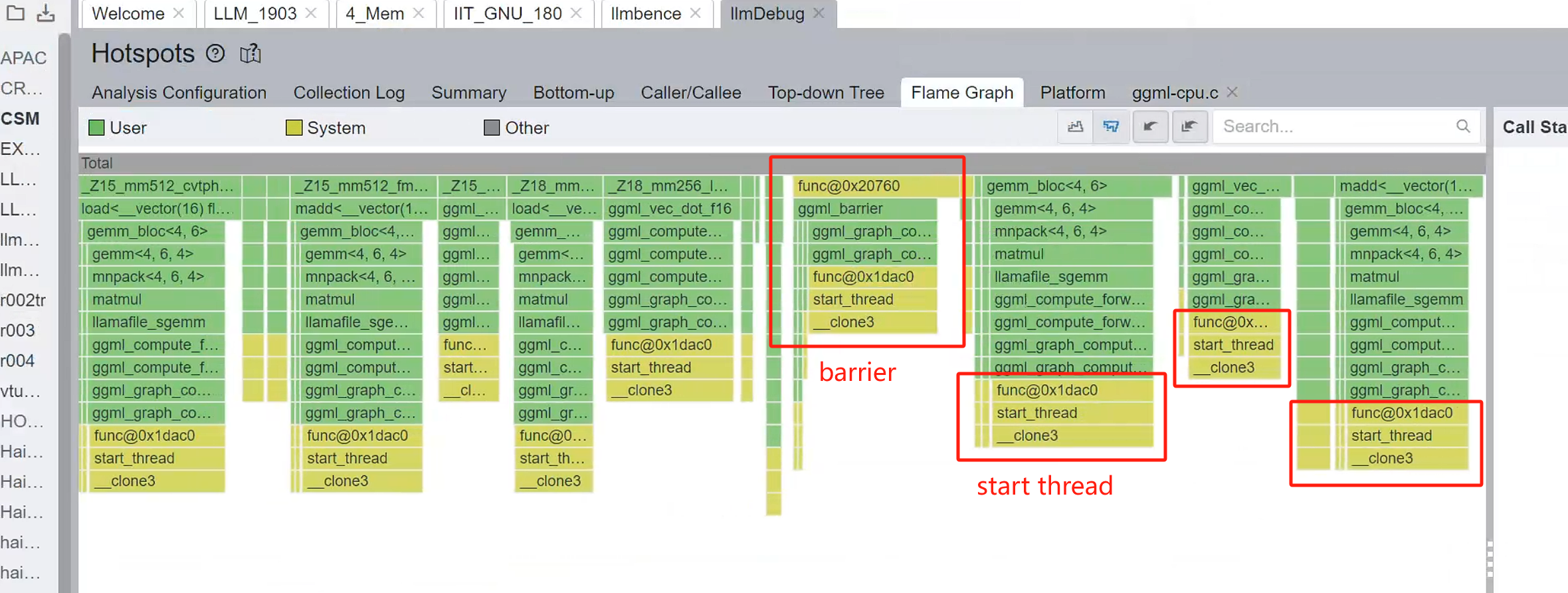
这里 build_graph 函数来自很多地方,不同的模型会使用不同的搭建参数。为了确保稳定性,我的方法是用profiler查看方法调用栈来寻找对应的调用后端。如果没有profiler,你可能要自己手动插桩试试。
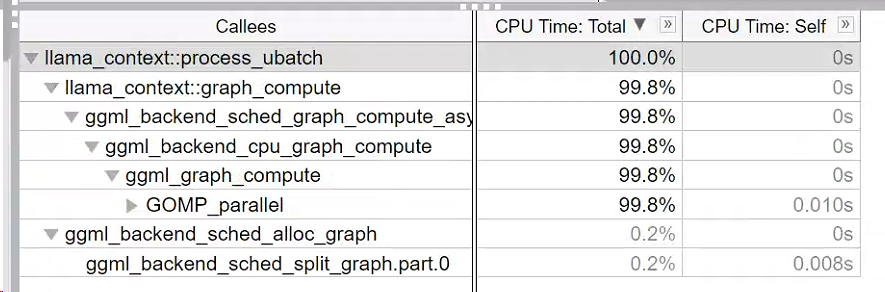
我们可以看到,函数调用了 ggml_backend_sched_alloc_graph,其内部又调用了 ggml_backend_sched_split_graph 函数和 ggml_backend_sched_alloc_splits(sched) 函数。
bool ggml_backend_sched_alloc_graph(ggml_backend_sched_t sched, struct ggml_cgraph * graph) {
    GGML_ASSERT((int)sched->hash_set.size >= graph->n_nodes + graph->n_leafs);
    ggml_backend_sched_split_graph(sched, graph); // assigns backends to ops and splits the graph into subgraphs that can be computed on the same backend

    if (!ggml_backend_sched_alloc_splits(sched)) {
        return false;
    }
    sched->is_alloc = true;
    return true;
}
ggml_backend_sched_split_graph
函数 ggml_backend_sched_split_graph()作用是:
为 GGML 的计算图 (
ggml_cgraph) 中的各个算子节点(op/tensor)分配合适的 backend(如 CPU、CUDA、Metal 等),并据此将计算图划分为多个可以在同一 backend 上运行的子图。
这里backend还是非常多的,我们看x86上CPU就有这么多:(llama.cpp/ggml/include/ggml-cpu.h llama.cpp)
    // x86
    GGML_BACKEND_API int ggml_cpu_has_sse3       (void);
    GGML_BACKEND_API int ggml_cpu_has_ssse3      (void);
    GGML_BACKEND_API int ggml_cpu_has_avx        (void);
    GGML_BACKEND_API int ggml_cpu_has_avx_vnni   (void);
    GGML_BACKEND_API int ggml_cpu_has_avx2       (void);
    GGML_BACKEND_API int ggml_cpu_has_bmi2       (void);
    GGML_BACKEND_API int ggml_cpu_has_f16c       (void);
    GGML_BACKEND_API int ggml_cpu_has_fma        (void);
    GGML_BACKEND_API int ggml_cpu_has_avx512     (void);
    GGML_BACKEND_API int ggml_cpu_has_avx512_vbmi(void);
    GGML_BACKEND_API int ggml_cpu_has_avx512_vnni(void);
    GGML_BACKEND_API int ggml_cpu_has_avx512_bf16(void);
GGML_BACKEND_API int ggml_cpu_has_amx_int8 (void);这里,这段函数可以分成两段:构建与切分。
我们来看它的构建部分源码。(删减版本)
// assigns backends to ops and splits the graph into subgraphs that can be computed on the same backend
static void ggml_backend_sched_split_graph(ggml_backend_sched_t sched, struct ggml_cgraph * graph) {
    // reset splits
    sched->n_splits = 0;
    sched->n_graph_inputs = 0;
    sched->is_reset = false;

    struct ggml_init_params params = {
        /* .mem_size =   */ sched->context_buffer_size,
        /* .mem_buffer = */ sched->context_buffer,
        /* .no_alloc =   */ true
    };

    ggml_free(sched->ctx);

    sched->ctx = ggml_init(params);
    if (sched->ctx == NULL) {
        GGML_ABORT("%s: failed to initialize context\n", __func__);
    }

    // pass 1: assign backends to ops with pre-allocated inputs
    for (int i = 0; i < graph->n_leafs; i++) {
        struct ggml_tensor * leaf = graph->leafs[i];
        int * leaf_backend_id = &tensor_backend_id(leaf);
        // do not overwrite user assignments
        if (*leaf_backend_id == -1) {
            *leaf_backend_id = ggml_backend_sched_backend_id_from_cur(sched, leaf);
        }
    }
     .....

    // pass 2: expand current backend assignments
    // assign the same backend to adjacent nodes
    // expand gpu backends (i.e. non last prio) up and down, ignoring cpu (the lowest priority backend)
    // thus, cpu will never be used unless weights are on cpu, or there are no gpu ops between cpu ops
    // ops unsupported by the backend being expanded will be left unassigned so that they can be assigned later when the locations of its inputs are known
    // expand gpu down
    {
        int cur_backend_id = -1;
        for (int i = 0; i < graph->n_nodes; i++) {
            struct ggml_tensor * node = graph->nodes[i];
            if (ggml_is_view_op(node->op)) {
                continue;
            }
            int * node_backend_id = &tensor_backend_id(node);
            if (*node_backend_id != -1) {
                if (*node_backend_id == sched->n_backends - 1) {
                    // skip cpu (lowest prio backend)
                    cur_backend_id = -1;
                } else {
                    cur_backend_id = *node_backend_id;
                }
            } else if (cur_backend_id != -1) {
                ggml_backend_sched_set_if_supported(sched, node, cur_backend_id, node_backend_id);
            }
        }
    }
    // expand gpu up
    {
     .....

    // pass 3: upgrade nodes to higher prio backends with compatible buffer types
    // if the tensor is already in the same buffer type (*) as another higher priority backend, we should move it there
    // however, we also need to verify that the sources are in compatible buffer types
    // (*) the actual requirement is more relaxed, the buffer type of the backend should be supported by all the users of this tensor further down the graph
    // however, this is slow to verify, so we have a more strict requirement that the buffer type is the same
    // this is not uncommon since multiple backends can use host memory, with the same buffer type (eg. BLAS and CPU)
    // additionally, set remaining unassigned nodes to the backend with the most supported inputs
    // only nodes that could not be assigned during expansion due to the backend not supporting the op should be unassigned at this point
    for (int i = 0; i < graph->n_nodes; i++) {
        struct ggml_tensor * node = graph->nodes[i];
        if (ggml_is_view_op(node->op)) {
            continue;
        }
        int * node_backend_id = &tensor_backend_id(node);
        if (*node_backend_id == -1) {
            // unassigned node: find the backend with the most supported inputs
            int n_supported_best = -1;
            for (int b = 0; b < sched->n_backends; b++) {
                if (ggml_backend_supports_op(sched->backends[b], node)) {
                    int n_supported = 0;
                    for (int j = 0; j < GGML_MAX_SRC; j++) {
                        struct ggml_tensor * src = node->src[j];
                        if (src == NULL) {
                            continue;
                        }
                        if ((tensor_backend_id(src) != -1 || tensor_backend_id(src->view_src) != -1) && ggml_backend_sched_buffer_supported(sched, src, b)) {
                            n_supported++;
                        }
                    }
                    if (n_supported > n_supported_best) {
                        n_supported_best = n_supported;
                        *node_backend_id = b;
                        SET_CAUSE(node, "3.best");
                    }
                }
            }
        } else {
             .....
我们首先先看计算图的构建
这段函数完成了调度器的核心逻辑:
- 预处理:初始化调度器上下文
- backend 分配:
- 为所有节点(输入与计算节点)分配适当的 backend。
- 以支持的 op 和 buffer 类型为依据。
- backend 扩散:
- 将 backend 从已分配节点传播到相邻未分配节点,形成 backend 连续的子图。
- 节点升级:
- 对未分配的节点选择最佳 backend。
- 对已分配的节点尝试升级到更高优先级 backend(如果兼容)。
GPT总结了3个Pass各自做的事情。我们将在接下来用例子解释这些部分。
| 阶段 | 行为 | 目标 |
|---|---|---|
| Pass 1 | 初始分配 backend | 尽量分配给支持 op 的 backend |
| Pass 2 | 向前/向后扩展 backend | 避免不必要的跨 backend |
| Pass 3 | ✨提升节点到更高优先级 backend ✨✏️或分配尚未分配的节点 | 增加执行效率,减少 fallback、拷贝等代价 |
我们举个简单例子:
这是一个经典的计算图
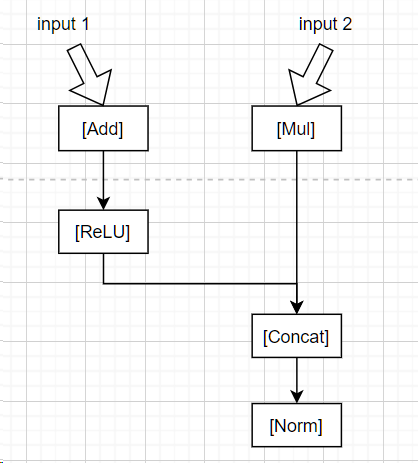
它就会变成:
Input1  -> node0  (leaf)
Input2  -> node1  (leaf)
Add     -> node2  = Add(node0, const)
ReLU    -> node3  = ReLU(node2)
Mul     -> node4  = Mul(node1, const)
Concat  -> node5  = Concat(node3, node4)
Norm    -> node6  = Norm(node5)
对应文章[1]的这张图片:
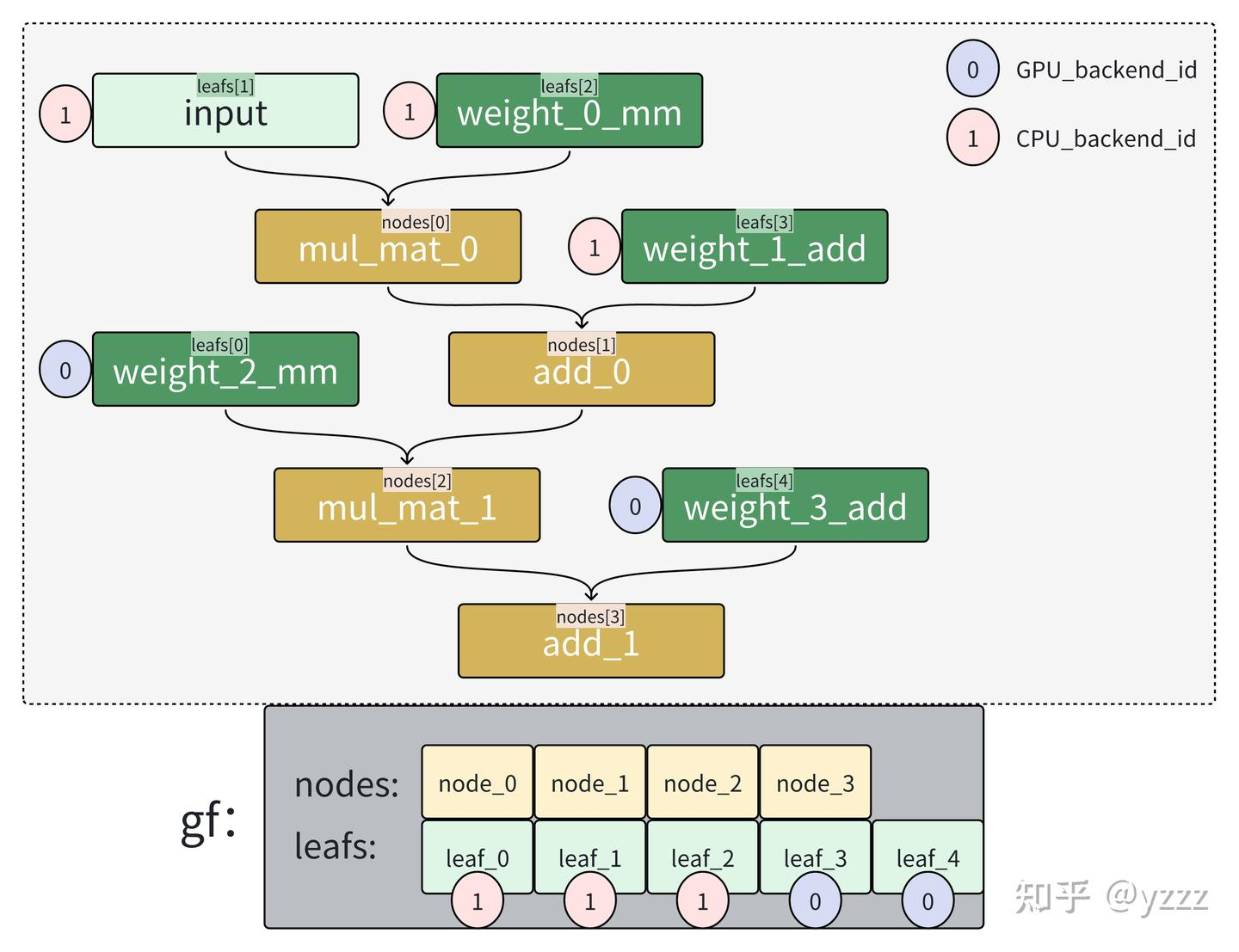
Pass 1:预分配 backend(没有用户指定)
在加载完毕.gguf文件之后,我们只有一个weight tensor的列表(用struct ggml_tensor * src[GGML_MAX_SRC];结构体链接)但是我们还没有构建好,哪部分结构体是模型的哪个层,以及计算图的哪个层。因此我们需要将他们分配。
调度器查看每个 op 的类型,并基于 op 类型尝试分配:
Input1、Input2:没有 backend,延后决定Add,ReLU,Mul,Concat,Norm:都尝试调用ggml_backend_sched_backend_id_from_cur()自动选择 backend
假设 GPU 支持 Add/ReLU/Mul/Concat,不支持 Norm
node2 (Add)     -> GPU
node3 (ReLU)    -> GPU
node4 (Mul)     -> GPU
node5 (Concat)  -> GPU
node6 (Norm)    -> -1   // 暂未支持
Pass 2:backend 扩展
backend扩散 这一步非常关键。它在已经分配的节点下传播backend。比如节点1在GPU上,那么节点2就尽可能也是在GPU上。
同时 节点升级 这一步是这样的,如果一个节点当前被分配到了低优先级的 backend(例如 CPU),但高优先级 backend(例如 GPU)也支持这个 op 且 buffer 类型一致或兼容,就将它“提升”上去。
- 因为 Add/ReLU/Mul/Concat 都在 GPU,调度器尝试将未分配的前后节点也拉入 GPU
- 但
Norm不被 GPU 支持 → 留空 - 所以扩展完如下:
Input1 (node0)     → GPU
Input2 (node1)     → GPU
Add     (node2)    → GPU
ReLU    (node3)    → GPU
Mul     (node4)    → GPU
Concat  (node5)    → GPU
Norm    (node6)    → -1   // 仍未分配
Pass 3:补分配未分配节点 / 提升已有节点 backend
Norm被判断为只能被 CPU 支持- 查它的输入
Concat是 GPU 的,调度器检查其 buffer 是否可以被 CPU 兼容 - 如果兼容,就将
Norm分配给 CPU
最终 backend 分配如下:
Input1   (node0) → GPU
Input2   (node1) → GPU
Add      (node2) → GPU
ReLU     (node3) → GPU
Mul      (node4) → GPU
Concat   (node5) → GPU
Norm     (node6) → CPU   ← fallback 分支
最终,图被划分为两个子图:
GPU子图
Input1 → Add → ReLU
Input2 → Mul
ReLU + Mul → Concat
CPU子图
Concat → Norm合并图:
[GPU Subgraph]
  Input1     Input2
     |          |
    [Add]      [Mul]
       \       /
       [ReLU][ ]
           \  /
          [Concat]

[CPU Subgraph]
         |
       [Norm]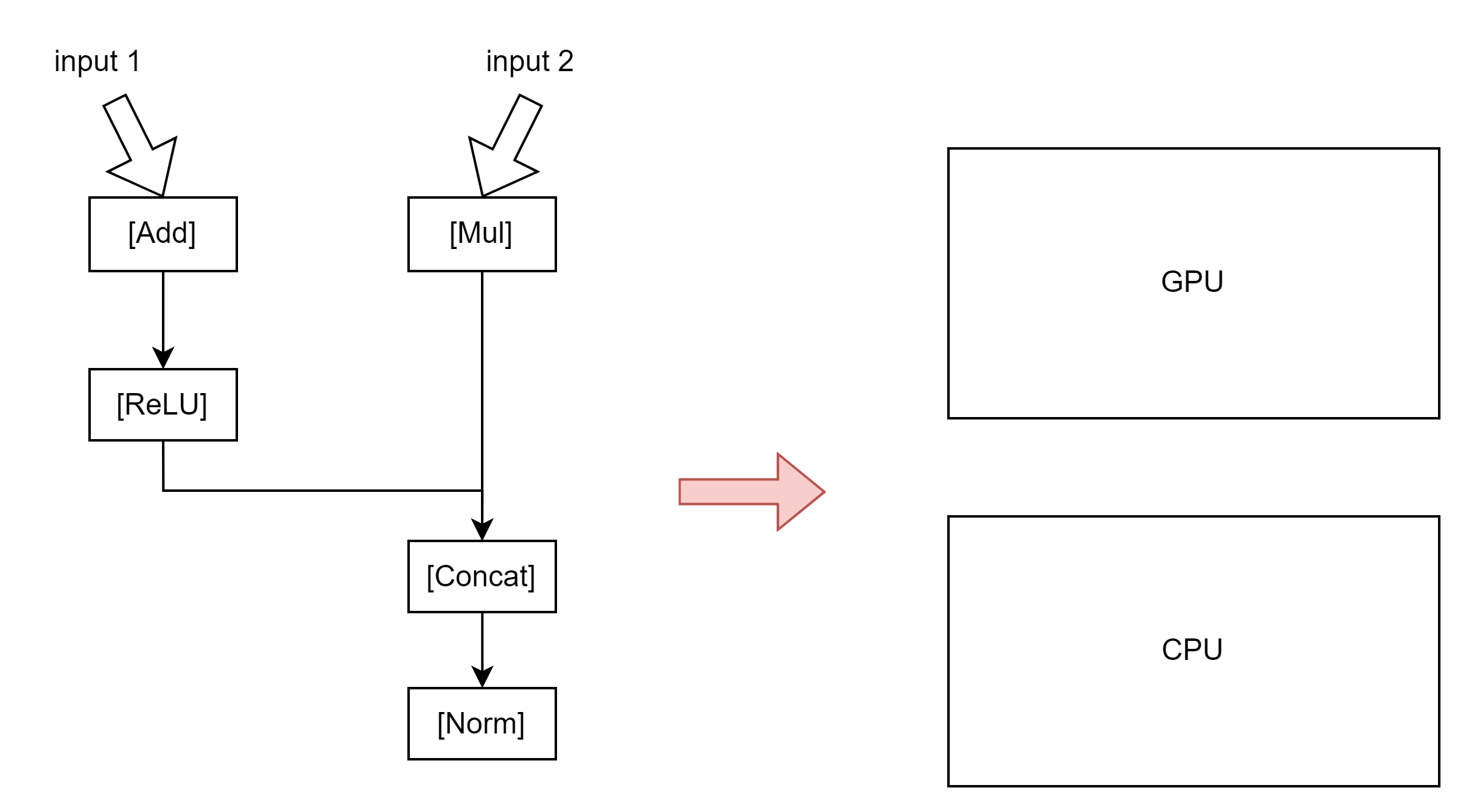
那么在这一段,我们就成功构建了计算图的基本部分,一些CPU的计算图,和GPU的计算图。但是,我们这里还没有构建CPU-GPU的数据传输。换句话说,我们还没有“把图连起来”。而这就是接下来第4步和第5步的主要工作:
| Pass | 名称 | 作用 | 关键行为 |
|---|---|---|---|
| 4 | 补全 view/source backend | 保证所有 tensor 都有 backend | - view 继承 source- source 继承当前 node |
| 5 | 构造 split & 插入 copy | 基于 backend 割图,插入 tensor 拷贝,构造分段调度子图 | - backend 改变触发新 split- 不兼容时插入 copy- 填充 inputs、leafs 到新 graph |
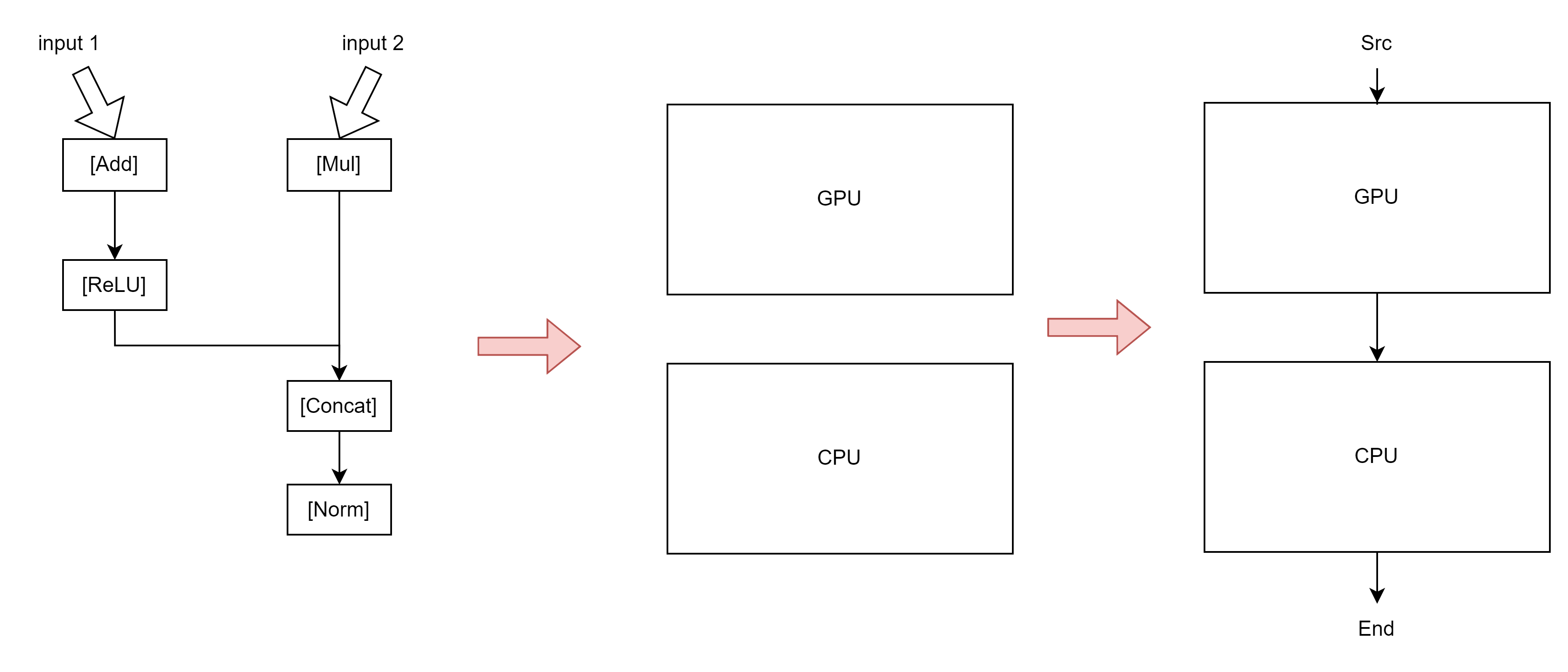
这张图是错误的但我懒得搞,因为它大概解释了这阶段在干什么。
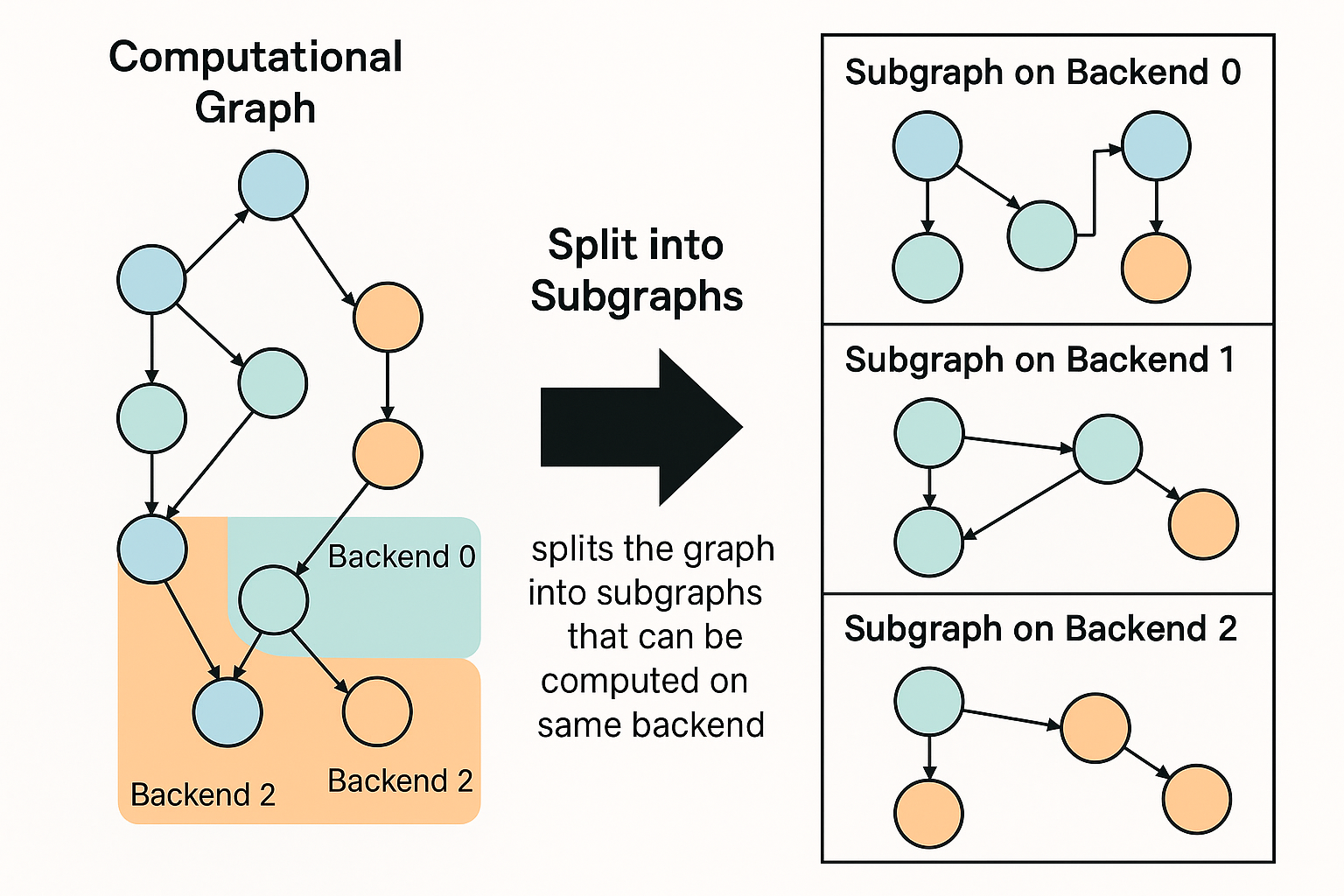
pass 4: 继承 view / source 的 backend
这一阶段的目标是补全仍未设置 backend 的 tensor,利用其 view_src 或与之连接的其他 tensor:
| 步骤 | 动作 | 说明 |
|---|---|---|
| 1 | 遍历每个 tensor node,如果它是 view tensor 且 backend 未设置(-1),则继承 view_src 的 backend |
views 总是和源 tensor 使用相同 backend |
| 2 | 遍历 node->src[] 中的每个 source,如果 backend 未设置: ① 若它也是 view,则继承其 view 源 ② 否则继承当前 node 的 backend |
这一步确保 graph 中所有 tensor 都被赋予 backend,避免未定义状态 |
pass 5: 划分 split,插入必要的 tensor 拷贝
这一步骤的目标是根据 backend 分界划分执行 split,并插入必要的 tensor 拷贝,确保不同 backend 之间的数据传递可执行:
| 步骤 | 动作 | 说明 |
|---|---|---|
| 1 | 找到第一个非 view op 的 node,作为第一个 split 的开始 | View op 不会触发实际计算,跳过 |
| 2 | 遍历后续 node,若 backend 改变或以下条件满足就触发新的 split: - source 是 weights 且 backend 不兼容 - split 的 inputs 已达最大值(避免过大 split) | split 是同一 backend 上连续执行的子图,split 的切分影响调度与内存复用 |
| 3 | 如果当前 node 依赖的 source 在不同 backend,且不支持 buffer 共享: 则为 source 创建一个拷贝 tensor,放到 split 对应 backend | 保证跨 backend 的 tensor 能正确传递 |
| 4 | 为 n_copies > 1 的场景构造每个 input tensor 的多个拷贝 |
适配多张卡、多次重复推理等场景 |
| 5 | 构造 sched->graph,为每个 split 填充执行子图与 leaf/input |
最终生成多份小图,供 ggml-alloc 和执行器调度 |
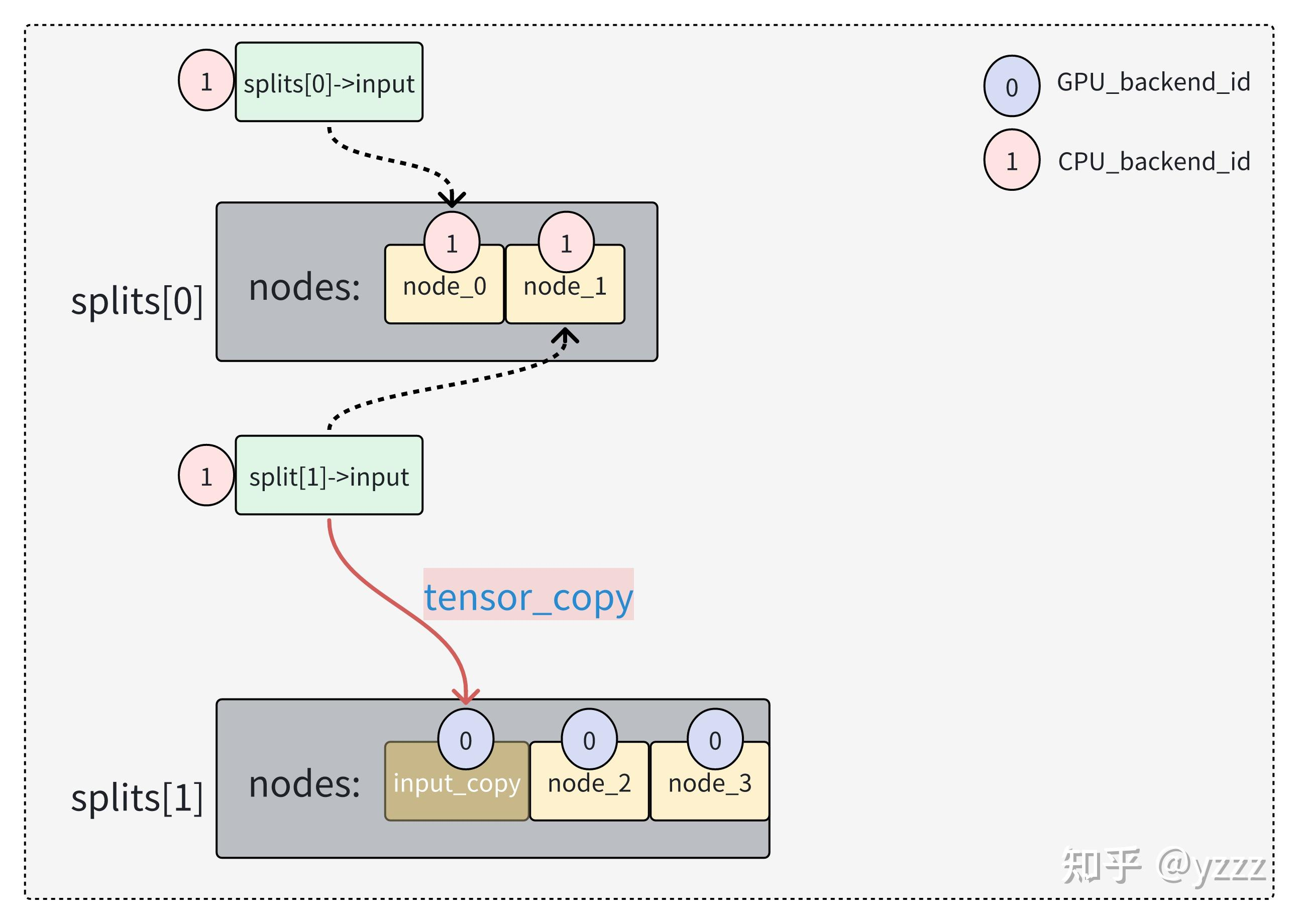
这两个 pass(pass 4 和 pass 5)是 GGML 的后端调度器 ggml_backend_sched_assign() 中的关键阶段,目的是 补全 backend 分配、构造执行分割(split)并处理跨 backend 的 tensor 拷贝。
ggml_backend_sched_alloc_splits
static bool ggml_backend_sched_alloc_splits(ggml_backend_sched_t sched) {
    bool backend_ids_changed = false;
    for (int i = 0; i < sched->graph.n_nodes; i++) {
        if (sched->node_backend_ids[i] != sched->prev_node_backend_ids[i] &&
            sched->bufts[sched->node_backend_ids[i]] != sched->bufts[sched->prev_node_backend_ids[i]]) {
            backend_ids_changed = true;
            break;
        }
    }
    if (!backend_ids_changed) {
        for (int i = 0; i < sched->graph.n_leafs; i++) {
            if (sched->leaf_backend_ids[i] != sched->prev_leaf_backend_ids[i] &&
                sched->bufts[sched->leaf_backend_ids[i]] != sched->bufts[sched->prev_leaf_backend_ids[i]]) {
                backend_ids_changed = true;
                break;
            }
        }
    }

    // allocate graph
    if (backend_ids_changed || !ggml_gallocr_alloc_graph(sched->galloc, &sched->graph)) {
        // the re-allocation may cause the split inputs to be moved to a different address
        // synchronize without ggml_backend_sched_synchronize to avoid changing cur_copy
        for (int i = 0; i < sched->n_backends; i++) {
            ggml_backend_synchronize(sched->backends[i]);
        }
        ggml_gallocr_reserve_n(sched->galloc, &sched->graph, sched->node_backend_ids, sched->leaf_backend_ids);
        if (!ggml_gallocr_alloc_graph(sched->galloc, &sched->graph)) {
            GGML_LOG_ERROR("%s: failed to allocate graph\n", __func__);
            return false;
        }
    }

    return true;
}判断是否需要重新为计算图分配内存(allocation),如果需要就执行重新分配。
在 GGML 中,计算图的 tensor 分配(内存地址)与它的 backend 分配情况(在哪个设备上计算) 强相关。
当 backend 分配发生改变时(比如 tensor 从 CPU 迁移到了 GPU),原来的内存分配可能就不再合适,因此需要
- 重新 reserve memory
- 重新 alloc memory
| 步骤 | 含义 |
|---|---|
① 检查 backend_id 是否变化 |
决定是否要重新分配内存 |
② 尝试直接 alloc_graph |
如果失败进入 fallback 逻辑 |
| ③ 同步 backend | 确保没有悬空计算使用旧内存 |
| ④ reserve + re-alloc | 分配新的 tensor buffer 地址 |
计算图的计算计划 graph_compute & cplan
在计算的backend以及计算顺序都确定好后,我们就可以开始计算了!
在计算阶段的方法调用栈如下:

确定通信和计算
ggml_status llama_context::graph_compute(
            ggml_cgraph * gf,
                   bool   batched) {
    int n_threads        = batched ? cparams.n_threads_batch : cparams.n_threads;
    ggml_threadpool_t tp = batched ? threadpool_batch        : threadpool;

    if (backend_cpu != nullptr) {
        auto * reg = ggml_backend_dev_backend_reg(ggml_backend_get_device(backend_cpu));
        auto * set_threadpool_fn = (decltype(ggml_backend_cpu_set_threadpool) *) ggml_backend_reg_get_proc_address(reg, "ggml_backend_cpu_set_threadpool");
        set_threadpool_fn(backend_cpu, tp);
    }

    // set the number of threads for all the backends
    for (const auto & set_n_threads_fn : set_n_threads_fns) {
        set_n_threads_fn.second(set_n_threads_fn.first, n_threads);
    }

    auto status = ggml_backend_sched_graph_compute_async(sched.get(), gf);
    if (status != GGML_STATUS_SUCCESS) {
        LLAMA_LOG_ERROR("%s: ggml_backend_sched_graph_compute_async failed with error %d\n", __func__, status);
    }

    // fprintf(stderr, "splits: %d\n", ggml_backend_sched_get_n_splits(sched));

    return status;
}
那么这里最重要的是 auto status = ggml_backend_sched_graph_compute_async(sched.get(), gf);
enum ggml_status ggml_backend_sched_graph_compute_async(ggml_backend_sched_t sched, struct ggml_cgraph * graph) {
    if (!sched->is_reset && !sched->is_alloc) {
        ggml_backend_sched_reset(sched);
    }
    if (!sched->is_alloc) {
        if (!ggml_backend_sched_alloc_graph(sched, graph)) {
            return GGML_STATUS_ALLOC_FAILED;
        }
    }
    return ggml_backend_sched_compute_splits(sched);
}
ggml_backend_sched_compute_splits 函数负责在多后端(例如 CPU、GPU)之间协调数据传输和图计算,并确保正确的同步机制和异步调度。
 static enum ggml_status ggml_backend_sched_compute_splits(ggml_backend_sched_t sched) {
 ...
 // copy the input tensors to the split backend
        for (int j = 0; j < split->n_inputs; j++) {
            ggml_backend_t input_backend = ggml_backend_sched_get_tensor_backend(sched, split->inputs[j]);
            struct ggml_tensor * input = split->inputs[j];
            struct ggml_tensor * input_cpy = tensor_copy(input, split_backend_id, sched->cur_copy);

            if (input->flags & GGML_TENSOR_FLAG_INPUT) {
                // inputs from the user must be copied immediately to prevent the user overwriting the data before the copy is done
                if (sched->events[split_backend_id][sched->cur_copy] != NULL) {
                    ggml_backend_event_synchronize(sched->events[split_backend_id][sched->cur_copy]);
                } else {
                    ggml_backend_synchronize(split_backend);
                }
                ggml_backend_tensor_copy(input, input_cpy);
            }
        }
    ...
        if (!sched->callback_eval) {
            enum ggml_status ec = ggml_backend_graph_compute_async(split_backend, &split->graph); //计算
            if (ec != GGML_STATUS_SUCCESS) {
                return ec;
            }
        }
ggml_backend_sched_compute_splits 函数负责在多后端(例如 CPU、GPU)之间协调数据传输和图计算,并确保正确的同步机制和异步调度。在这里我们可以看到,每一步都会寻找当前计算节点的backend: ggml_backend_t input_backend = ggml_backend_sched_get_tensor_backend(sched, split->inputs[j]);
调用tensor进行计算
在把tensor复制过去后,就会调用ggml_backend_graph_compute_async(split_backend, &split->graph); 进行计算
enum ggml_status ggml_backend_graph_compute_async(ggml_backend_t backend, struct ggml_cgraph * cgraph) {
    return backend->iface.graph_compute(backend, cgraph);
}
backend->iface 是 backend接口(interface)抽象层,在 GGML 中用于封装每种后端(如 CPU、CUDA、Metal 等)所支持的操作函数集合。你可以将它理解为一种 函数指针表(虚函数表),为不同的 backend 提供统一的调度接口。
由 backend 实现的计算图执行函数
每个后端会实现自己的版本,例如:
ggml_backend_cpu_graph_compute():CPU 上串行/并行计算子图;ggml_backend_cuda_graph_compute():CUDA backend ;- 自定义后端(如 OpenCL、HIP)也可以挂自己的版本。
如果你是CPU
static enum ggml_status ggml_backend_cpu_graph_compute(ggml_backend_t backend, struct ggml_cgraph * cgraph) {
    struct ggml_backend_cpu_context * cpu_ctx = (struct ggml_backend_cpu_context *)backend->context;

    struct ggml_cplan cplan = ggml_graph_plan(cgraph, cpu_ctx->n_threads, cpu_ctx->threadpool);

    if (cpu_ctx->work_size < cplan.work_size) {
        delete[] cpu_ctx->work_data;
        cpu_ctx->work_data = new uint8_t[cplan.work_size];
        if (cpu_ctx->work_data == NULL) {
            cpu_ctx->work_size = 0;
            return GGML_STATUS_ALLOC_FAILED;
        }
        cpu_ctx->work_size = cplan.work_size;
    }
    cplan.work_data = (uint8_t *)cpu_ctx->work_data;

    cplan.abort_callback      = cpu_ctx->abort_callback;
    cplan.abort_callback_data = cpu_ctx->abort_callback_data;

    return ggml_graph_compute(cgraph, &cplan);
}
看码说话:先建立 ggml_graph_plan ,确定worksize,随后计算
Graph Plan
ggml_graph_plan() 函数作用是:
🔧 为计算图
ggml_cgraph的执行生成一个并行调度计划(plan),包括:
① 建议使用的线程数(考虑任务可并行度),
② 每个线程所需的中间缓冲区大小(work buffer),
③ 是否需要使用指定的线程池。
这个函数会决定我们的mem和线程数量,根据我们的具体任务。(比如一个任务要是只能用1个线程,那它就只能用一个线程)
struct ggml_cplan ggml_graph_plan(
          const struct ggml_cgraph * cgraph,
                               int   n_threads,
            struct ggml_threadpool * threadpool) {

    if (threadpool == NULL) {
        //GGML_PRINT_DEBUG("Threadpool is not specified. Will create a disposable threadpool : n_threads %d\n", n_threads);
    }
    if (n_threads <= 0) {
        n_threads = threadpool ? threadpool->n_threads_max : GGML_DEFAULT_N_THREADS;
    } // 初始化线程数

    size_t work_size = 0;

    struct ggml_cplan cplan;
    memset(&cplan, 0, sizeof(struct ggml_cplan));

    int max_tasks = 1;

    // thread scheduling for the different operations + work buffer size estimation
    for (int i = 0; i < cgraph->n_nodes; i++) {
        struct ggml_tensor * node = cgraph->nodes[i]; // 遍历图中的每个节点,分析

        const int n_tasks = ggml_get_n_tasks(node, n_threads);

        max_tasks = MAX(max_tasks, n_tasks);

        size_t cur = 0;

        if (!ggml_cpu_extra_work_size(n_threads, node, &cur)) {
            switch (node->op) {
                case GGML_OP_CPY:
                case GGML_OP_DUP:
                    {
                        if (ggml_is_quantized(node->type) ||
                            // F16 -> BF16 and BF16 -> F16 copies go through intermediate F32
                                ....
                        }
                    } break;
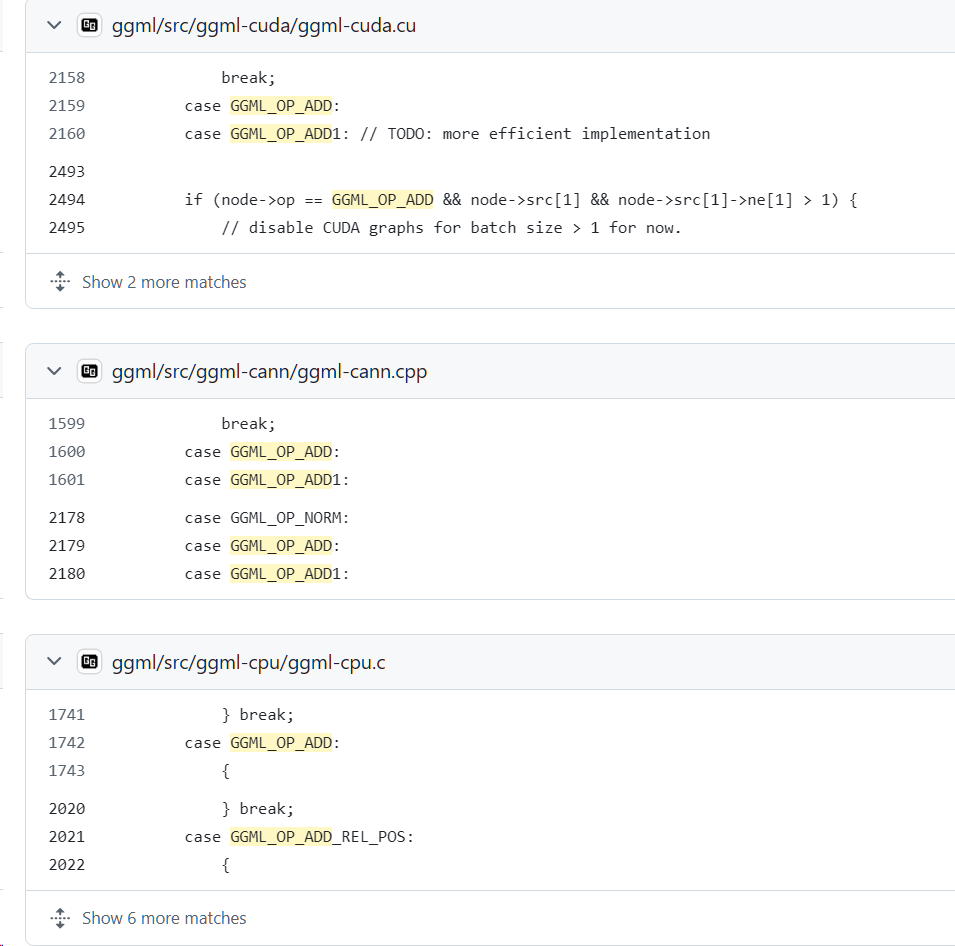
                case GGML_OP_ADD:
                case GGML_OP_ADD1:
                    {
                        if (ggml_is_quantized(node->src[0]->type)) {
                            cur = ggml_type_size(GGML_TYPE_F32) * node->src[0]->ne[0] * n_tasks;
                        }
                    } break;
                case GGML_OP_ACC:
                    {
                        if (ggml_is_quantized(node->src[0]->type)) {
                            cur = ggml_type_size(GGML_TYPE_F32) * node->src[1]->ne[0] * n_tasks;
                        }
                    } break;
..... // 各种算子
                case GGML_OP_FLASH_ATTN_BACK:
                    {
                        const int64_t    D = node->src[0]->ne[0];
                        const int64_t ne11 = ggml_up(node->src[1]->ne[1], GGML_SOFT_MAX_UNROLL);
                        const int64_t mxDn = MAX(D, ne11) * 2; // *2 because of S and SM in ggml_compute_forward_flash_attn_back
                        if (node->src[1]->type == GGML_TYPE_F32) {
                            cur  = sizeof(float)*mxDn*n_tasks; // TODO: this can become (n_tasks-1)
                            cur += sizeof(float)*mxDn*n_tasks; // this is overestimated by x2
                        } else if (node->src[1]->type == GGML_TYPE_F16) {
                            cur  = sizeof(float)*mxDn*n_tasks; // TODO: this can become (n_tasks-1)
                            cur += sizeof(float)*mxDn*n_tasks; // this is overestimated by x2
                        } else if (node->src[1]->type == GGML_TYPE_BF16) {
                            cur  = sizeof(float)*mxDn*n_tasks; // TODO: this can become (n_tasks-1)
                            cur += sizeof(float)*mxDn*n_tasks; // this is overestimated by x2
                        }
                    } break;

                case GGML_OP_CROSS_ENTROPY_LOSS:
                    {
                        cur = ggml_type_size(node->type)*(n_tasks + node->src[0]->ne[0]*n_tasks);
                    } break;
                case GGML_OP_COUNT:
                    {
                        GGML_ABORT("fatal error");
                    }
                default:
                    break;
            }
        }

        work_size = MAX(work_size, cur);
    }

    if (work_size > 0) {
        work_size += CACHE_LINE_SIZE*(n_threads);
    }

    cplan.threadpool = threadpool;
    cplan.n_threads  = MIN(max_tasks, n_threads);
    cplan.work_size  = work_size;
    cplan.work_data  = NULL;

    return cplan;
}
我用两张表总结:表1是执行流程,表2是各种算子
| 阶段 | 步骤 | 关键操作 | 说明 |
|---|---|---|---|
| 1️⃣ 初始化参数 | 判断是否给定 threadpool |
决定是否使用外部线程池或临时创建 | |
判断 n_threads 是否 > 0 |
若 ≤0,则根据 threadpool 或默认线程数设置 |
||
| 2️⃣ 遍历图节点 | 遍历每个节点 node |
for i in 0..n_nodes |
主循环 |
获取 n_tasks |
ggml_get_n_tasks(node, n_threads) |
估算该节点可并行任务数 | |
| 更新最大并行任务数 | max_tasks = max(max_tasks, n_tasks) |
||
| 估算中间缓冲区大小 | 手动判断每种 op 需要多少中间 float[] 或其他类型内存 |
||
| 更新最大缓冲区 | work_size = max(work_size, cur) |
记录所有节点中最大的需求 | |
| 3️⃣ 添加 Cache Padding | 若需中间缓冲区 | work_size += CACHE_LINE_SIZE * n_threads |
避免 false sharing |
| 4️⃣ 构造计划结构体 | 设置 cplan 字段 |
填写 n_threads / work_size / threadpool / work_data 等 |
|
| 5️⃣ 返回执行计划 | return cplan |
ggml_get_n_tasks()根据张量维度决定该操作可分成多少个线程任务(例如矩阵按行/列分块);ggml_type_size()给出某类型(如 F32)的字节数;- 所有缓冲区估算只做“峰值”统计,因为
ggml_cgraph是串行依次执行节点的。
各个算子
算子名 (op) |
对应枚举 | 缓冲区估算逻辑 |
|---|---|---|
| 拷贝相关 | GGML_OP_CPY、GGML_OP_DUP |
若量化或 BF16<->F16 转换,需额外 F32 缓冲区 |
| 加法相关 | GGML_OP_ADD、GGML_OP_ADD1 |
若 src 是量化类型,需解量化为 F32 |
| 累加相关 | GGML_OP_ACC |
若 src[0] 是量化类型,需 F32 缓冲区 |
| Count equal | GGML_OP_COUNT_EQUAL |
每个任务需要类型大小的输出 |
| 矩阵乘法 | GGML_OP_MUL_MAT |
若类型不一致,需要转换为 vec_dot_type |
| 矩阵乘 + ID | GGML_OP_MUL_MAT_ID |
需要多个结构辅助:row_mapping、counts、chunk 等 |
| 外积 | GGML_OP_OUT_PROD |
同样考虑解量化需求 |
| softmax / rope | GGML_OP_SOFT_MAX、GGML_OP_ROPE、GGML_OP_ROPE_BACK |
每个线程一份 F32 临时数组 |
| 卷积反卷积 | GGML_OP_CONV_TRANSPOSE_1D/2D |
按输入权重类型判断是 F32/F16/BF16,缓存转换值 |
| flash attention | GGML_OP_FLASH_ATTN_EXT |
每线程缓存 K/V(F32) |
| flash attention backward | GGML_OP_FLASH_ATTN_BACK |
缓存 S/SM,2×F32×max(D, N)×n_tasks(较大) |
| cross entropy loss | GGML_OP_CROSS_ENTROPY_LOSS |
输出 loss 和中间概率分布 |
| 无效算子 | GGML_OP_COUNT |
调用 GGML_ABORT("fatal error") |
不同的后端会有相似的逻辑。
Compute 真正开始计算的地方
逻辑图如下图所示。这里它会展开一个大fork-join

第3118行, CPU Compute
enum ggml_status ggml_graph_compute(struct ggml_cgraph * cgraph, struct ggml_cplan * cplan) {
    ggml_cpu_init();

    GGML_ASSERT(cplan);
    GGML_ASSERT(cplan->n_threads > 0);
    GGML_ASSERT(cplan->work_size == 0 || cplan->work_data != NULL);

    int n_threads                               = cplan->n_threads;
    struct ggml_threadpool * threadpool = cplan->threadpool;

    bool disposable_threadpool = false;

    if (threadpool == NULL) {
        //GGML_PRINT_DEBUG("Threadpool is not specified. Will create a disposable threadpool : n_threads %d\n", n_threads);
        disposable_threadpool = true;

        struct ggml_threadpool_params ttp = ggml_threadpool_params_default(n_threads);
        threadpool = ggml_threadpool_new_impl(&ttp, cgraph, cplan);
    } else {
        // Reset some of the parameters that need resetting
        // No worker threads should be accessing the parameters below at this stage
        threadpool->cgraph           = cgraph;
        threadpool->cplan            = cplan;
        threadpool->current_chunk    = 0;
        threadpool->abort            = -1;
        threadpool->ec               = GGML_STATUS_SUCCESS;
    }

#ifdef GGML_USE_OPENMP
    if (n_threads > 1) {
        #pragma omp parallel num_threads(n_threads)
        {
            #pragma omp single
            {
                // update the number of threads from the actual number of threads that we got from OpenMP
                n_threads = omp_get_num_threads();
                atomic_store_explicit(&threadpool->n_threads_cur, n_threads, memory_order_relaxed);
            }

            ggml_graph_compute_thread(&threadpool->workers[omp_get_thread_num()]);
        }
    } else {
        atomic_store_explicit(&threadpool->n_threads_cur, 1, memory_order_relaxed);
        ggml_graph_compute_thread(&threadpool->workers[0]);
    }
#else
    if (n_threads > threadpool->n_threads_max) {
        GGML_LOG_WARN("cplan requested more threads (%d) than available (%d)\n", n_threads, threadpool->n_threads_max);
        n_threads = threadpool->n_threads_max;
    }

    // Kick all threads to start the new graph
    ggml_graph_compute_kickoff(threadpool, n_threads);

    // This is a work thread too
    ggml_graph_compute_thread(&threadpool->workers[0]);
#endif

    // don't leave affinity set on the main thread
    clear_numa_thread_affinity();

    enum ggml_status ret = threadpool->ec;

    if (disposable_threadpool) {
        ggml_threadpool_free(threadpool);
    }

    return ret;
}| 名称 | 类型 | 含义 | 结构层级 |
|---|---|---|---|
backend |
struct ggml_backend * |
抽象的后端(可能是 CPU / GPU / Vulkan 等) | 顶层 |
backend->context |
void * |
指向具体后端的上下文信息(不定类型) | 抽象层通用字段 |
cpu_ctx |
struct ggml_backend_cpu_context * |
CPU 后端的上下文结构体,包含线程池、缓冲区等具体内容 | CPU 专用层 |
关键部位:

因此这里的结构就是,我们每过一个计算节点,就会有一个barrier保证同步,然后move on to 下一个节点:
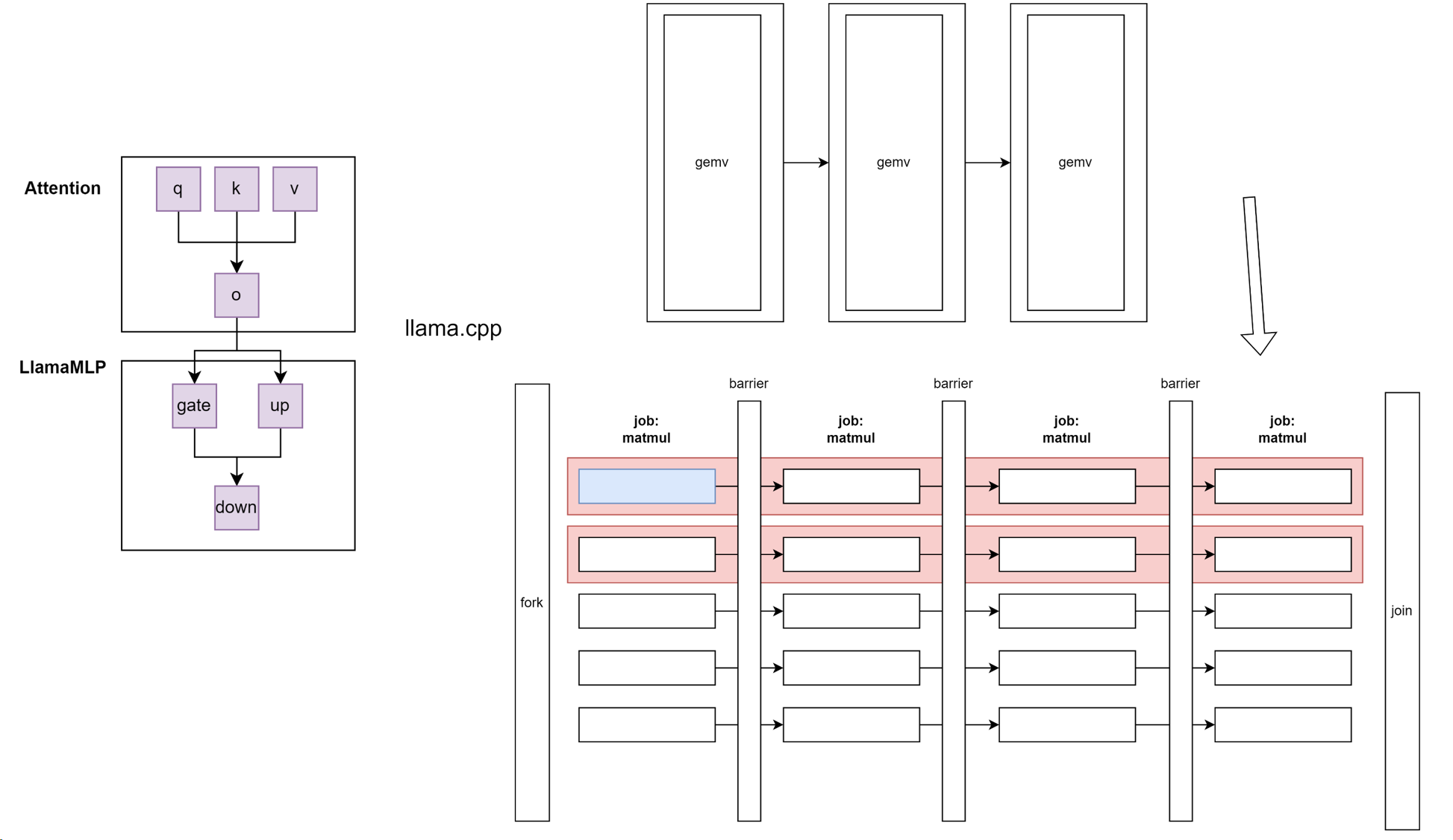
至于这里OpenMP怎么用 #pragma omp parallel 的,请参见我上一篇文章:
gcc是如何实现OpenMP parallel for的-编译原理-Haibin's blog
ggml_barrier
我们同步实现的函数
void ggml_barrier(struct ggml_threadpool * tp) {
    int n_threads = atomic_load_explicit(&tp->n_threads_cur, memory_order_relaxed);
    if (n_threads == 1) {
        return;
    }

#ifdef GGML_USE_OPENMP
    #pragma omp barrier
#else
    int n_passed = atomic_load_explicit(&tp->n_barrier_passed, memory_order_relaxed);

    // enter barrier (full seq-cst fence)
    int n_barrier = atomic_fetch_add_explicit(&tp->n_barrier, 1, memory_order_seq_cst);

    if (n_barrier == (n_threads - 1)) {
        // last thread
        atomic_store_explicit(&tp->n_barrier, 0, memory_order_relaxed);

        // exit barrier (fill seq-cst fence)
        atomic_fetch_add_explicit(&tp->n_barrier_passed, 1, memory_order_seq_cst);
        return;
    }

    // wait for other threads
    while (atomic_load_explicit(&tp->n_barrier_passed, memory_order_relaxed) == n_passed) {
        ggml_thread_cpu_relax();
    }

    // exit barrier (full seq-cst fence)
    // TSAN doesn't support standalone fence yet, we use a dummy read-modify-write instead
    #ifdef GGML_TSAN_ENABLED
    atomic_fetch_add_explicit(&tp->n_barrier_passed, 0, memory_order_seq_cst);
    #else
    atomic_thread_fence(memory_order_seq_cst);
    #endif
#endif
}
这是我们每个线程要做的工作:
Compute thread
static thread_ret_t ggml_graph_compute_thread(void * data) { // 这个是每个线程要工作的函数。
struct ggml_compute_state * state = (struct ggml_compute_state *) data;
struct ggml_threadpool * tp = state->threadpool;
const struct ggml_cgraph * cgraph = tp->cgraph; // 提前做好的graph
const struct ggml_cplan * cplan = tp->cplan; // 执行计划。先执行图的哪个节点
set_numa_thread_affinity(state->ith);
struct ggml_compute_params params = {
/*.ith =*/ state->ith,
/*.nth =*/ atomic_load_explicit(&tp->n_threads_cur, memory_order_relaxed),
/*.wsize =*/ cplan->work_size,
/*.wdata =*/ cplan->work_data,
/*.threadpool=*/ tp,
};
for (int node_n = 0; node_n < cgraph->n_nodes && atomic_load_explicit(&tp->abort, memory_order_relaxed) != node_n; node_n++) {
// 从计算图中拿出一个任务
struct ggml_tensor * node = cgraph->nodes[node_n];
ggml_compute_forward(¶ms, node); // 在这个图上往前计算一步。
// 如果任务已经全部执行完,由主线程决定退出计算图
        if (state->ith == 0 && cplan->abort_callback &&
                cplan->abort_callback(cplan->abort_callback_data)) {
            atomic_store_explicit(&tp->abort, node_n + 1, memory_order_relaxed);
            tp->ec    = GGML_STATUS_ABORTED;
        }
// 如果线程完成了当前任务,那么barrier等等别人有没有完成。完成了就进入for的下一个循环
if (node_n + 1 < cgraph->n_nodes) {
ggml_barrier(state->threadpool);
}
}
ggml_barrier(state->threadpool);
return 0;
}| 步骤 | 描述 |
|---|---|
| 初始化 | 每个线程根据编号设置亲和性,并准备好本线程的计算参数 |
| 图遍历 | 每个线程都顺序访问图中的节点(但只处理属于自己的部分) |
| 前向计算 | 调用 ggml_compute_forward 分工完成本节点的计算 |
| 同步 | 每个节点计算后全体线程通过 barrier 同步 |
| 中止检查 | 线程0根据 abort_callback 检查是否中断执行 |
| 结束 | 所有线程完成所有节点后,最后 barrier 保证同步退出 |
if (state->ith == 0 && cplan->abort_callback &&
cplan->abort_callback(cplan->abort_callback_data)) {
atomic_store_explicit(&tp->abort, node_n + 1, memory_order_relaxed);
tp->ec = GGML_STATUS_ABORTED;
}仅由 ith == 0 的主线程检查是否应该中止执行(调用 abort_callback);如果是,则写入 tp->abort 来让其他线程退出 loop。
vec.cpp核心算子
我们来看看其中一个核心算子
void ggml_vec_dot_f16(int n, float * GGML_RESTRICT s, size_t bs, ggml_fp16_t * GGML_RESTRICT x, size_t bx, ggml_fp16_t * GGML_RESTRICT y, size_t by, int nrc) {
    assert(nrc == 1);
    GGML_UNUSED(nrc);
    GGML_UNUSED(bx);
    GGML_UNUSED(by);
    GGML_UNUSED(bs);

    ggml_float sumf = 0.0;

#if defined(GGML_SIMD)
    const int np = (n & ~(GGML_F16_STEP - 1));

    GGML_F16_VEC sum[GGML_F16_ARR] = { GGML_F16_VEC_ZERO };

    GGML_F16_VEC ax[GGML_F16_ARR];
    GGML_F16_VEC ay[GGML_F16_ARR];

    for (int i = 0; i < np; i += GGML_F16_STEP) {
        for (int j = 0; j < GGML_F16_ARR; j++) {
            ax[j] = GGML_F16_VEC_LOAD(x + i + j*GGML_F16_EPR, j);
            ay[j] = GGML_F16_VEC_LOAD(y + i + j*GGML_F16_EPR, j);

            sum[j] = GGML_F16_VEC_FMA(sum[j], ax[j], ay[j]);
        }
    }

    // reduce sum0..sum3 to sum0
    GGML_F16_VEC_REDUCE(sumf, sum);

    // leftovers
    for (int i = np; i < n; ++i) {
        sumf += (ggml_float)(GGML_FP16_TO_FP32(x[i])*GGML_FP16_TO_FP32(y[i]));
    }
#else
    for (int i = 0; i < n; ++i) {
        sumf += (ggml_float)(GGML_FP16_TO_FP32(x[i])*GGML_FP16_TO_FP32(y[i]));
    }
#endif

    *s = sumf;
}
我们的线程池
threadpool
// Threadpool def
struct ggml_threadpool {
    ggml_mutex_t mutex;       // mutex for cond.var
    ggml_cond_t  cond;        // cond.var for waiting for new work

    struct ggml_cgraph * cgraph;
    struct ggml_cplan  * cplan;

    // synchronization primitives
    atomic_int n_graph;       // incremented when there is work to be done (i.e each graph)
    atomic_int GGML_CACHE_ALIGN n_barrier;
    atomic_int GGML_CACHE_ALIGN n_barrier_passed;
    atomic_int GGML_CACHE_ALIGN current_chunk; // currently processing chunk during Mat_Mul, shared between all the threads.

    // these are atomic as an annotation for thread-sanitizer
    atomic_bool stop;         // Used for stopping the threadpool altogether
    atomic_bool pause;        // Used for pausing the threadpool or individual threads
    atomic_int abort;         // Used for aborting processing of a graph

    struct ggml_compute_state * workers;   // per thread state
    int          n_threads_max; // number of threads in the pool
    atomic_int   n_threads_cur; // number of threads used in the current graph

    int32_t      prio;        // Scheduling priority
    uint32_t     poll;        // Polling level (0 - no polling)

    enum ggml_status ec;
};
总结:
我用一张图总结我们的所学: